
Run IT projects without the firefighting
Migrations slip, rollouts stall, and your best engineers disappear into ad-hoc work nobody logged. FlowQi gives internal IT teams one place to plan IT projects, balance engineer capacity and track every hour that goes into the stack — so the project finishes before the year does.

IT projects that never actually finish?
The ERP migration was supposed to take six weeks. Six months later we still have one team on it — and nobody can tell me why.
Three engineers, four projects, nine stakeholders and zero overview. Every Monday we realign, every Friday we're behind.
Our best engineer left because she was on five projects at once. Nobody saw her workload until her resignation letter.
We keep promising delivery dates to the business. We keep missing them. And nobody can prove where the time actually went.
Internal IT teams don't need another ticketing tool. They need clear IT projects, honest capacity and proof of where the hours go. That's what FlowQi delivers.
Ready to run IT projects that actually ship?
Try FlowQi freeFrom kickoff to go-live — one project flow
FlowQi connects the pieces that internal IT projects fall apart on: scope, capacity, time and stakeholder visibility.
Scope the IT project
Turn a rollout, migration or upgrade into a structured project with milestones, tasks, owners and a budget in hours. No more kickoff-by-email.
Check engineer capacity
See who's available this sprint before you assign work. Stop overloading the one engineer who knows the legacy system.
Assign and sequence the work
Break the project into tasks with dependencies, dates and owners. Kanban board or Gantt — whichever your team reads.
Track hours as work happens
Engineers log time against tasks. Project budget burns down live. You see overruns in week two, not at month-end.
Report without slide decks
Live dashboard for leadership: active IT projects, status, budget burn, capacity load. Stakeholders self-serve instead of asking for updates.
Everything an IT team needs for project delivery
A focused IT project management workspace — not an ITSM suite. FlowQi covers planning, capacity, time and stakeholder reporting. Pair it with your existing ticketing tool if you have one.

IT project planning
Migrations, rollouts, upgrades, integrations — every IT project gets its own workspace with scope, milestones, owners and a deadline.

Kanban & Gantt boards
Visualise project flow or plan the long timeline. Switch between board and timeline in one click.

Tasks with dependencies
Break the project into real work. Set dependencies so you see what blocks what, before the deadline does.

Engineer capacity
See who's overbooked and who has bandwidth — per week, per project. Assign with data, not guesswork.

Time on IT work
Log hours against tasks. Know exactly where the IT team's time went — per project, per engineer, per client or business unit.

Project budgets
Budget an IT project in hours or euros. Watch burn-rate live. Get flagged before a migration blows through scope.

Vendors & contracts
Track the external parties tied to your IT stack — vendors, integrators, consultants — as contacts with their contracts and renewal dates.

Leadership dashboards
Live view of every active IT project: status, budget, capacity, delivery risk. No more status-update slide decks.
One view across every IT project you run
Most internal IT teams run five to fifteen projects at once: migrations, rollouts, integrations, upgrades. One portfolio view shows what is active, who is on it, where the budget stands and what is at risk.

Prove the IT team's workload with real data
IT teams are asked to do more with less until someone quits. FlowQi shows exactly where the time goes across projects, so the conversation about headcount and scope runs on data.
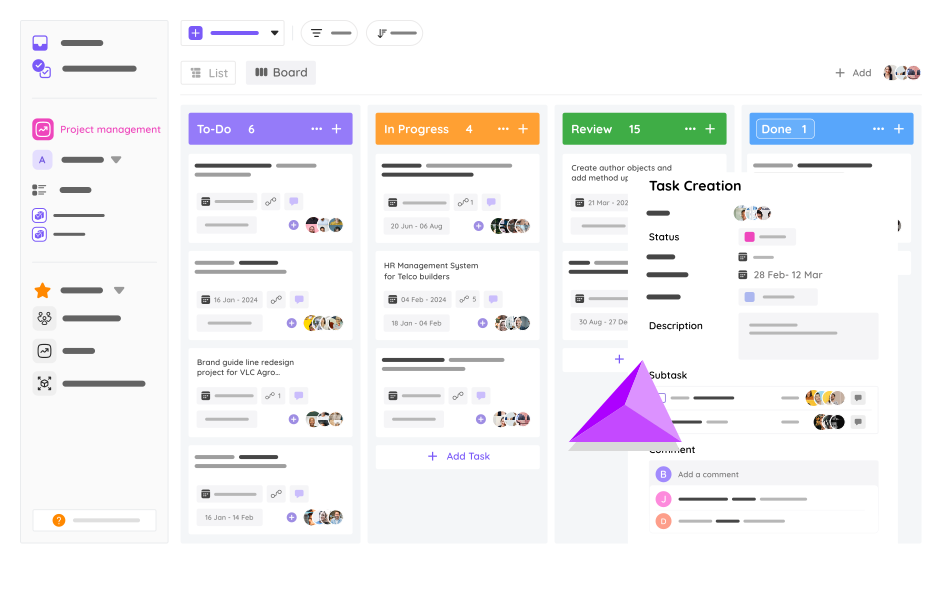
See how FlowQi brings clarity to IT project delivery.
Book a demoConnect the tools your IT team already runs on
FlowQi plays nice with your identity, devops and productivity stack.







IT project management — frequently asked questions
What is IT project management?
IT project management is the practice of planning, executing and delivering technology-focused projects inside an organisation — things like infrastructure migrations, platform rollouts, software implementations, cloud moves, security upgrades and integrations. It differs from general project management because the work usually involves specialist engineers, tight dependencies on existing systems, and coordination with both business stakeholders and external vendors. The goal is the same though: deliver on scope, on time, within budget.
How is IT project management different from IT service management (ITSM)?
IT project management is about delivering planned, scoped change — new systems, migrations, rollouts. ITSM (sometimes called IT service management or service desk) is about running the stack day to day — tickets, incidents, SLAs, changes, problem management. Tools like ServiceNow and Jira Service Management are ITSM tools. FlowQi is an IT project management tool. Most internal IT teams need both, and they pair well — FlowQi for project delivery, your existing ticketing tool for incident flow.
What kind of IT projects does FlowQi handle well?
Anything planned with a start, an end and a deliverable. Typical examples: ERP or CRM implementations, cloud migrations (on-prem to Azure, AWS or GCP), Microsoft 365 rollouts, identity-provider changes, network refreshes, security upgrades, platform consolidations, data migrations, and internal tool rollouts. If there’s a scope, a deadline and engineers involved, FlowQi gives you the structure to deliver it.
Does FlowQi replace Jira, ServiceNow or our ticketing system?
No — and it’s not trying to. FlowQi is built for IT project management, not for incident ticketing or service-desk workflows. If you run Jira, ServiceNow, Freshservice or similar, keep it. FlowQi sits alongside: you plan and deliver IT projects in FlowQi, your team handles tickets and SLAs where they already do. Time logged on a ticket can still roll up into a FlowQi project if that ticket is part of a larger initiative.
How does capacity planning work for an IT team?
Every task in FlowQi has an owner, an estimate and a time log. FlowQi rolls that up into a weekly capacity view per engineer — showing who is overbooked, who has bandwidth, and what the split is across active projects. IT leads use this for two things: assigning new project work honestly, and making the workload case to business leadership when the team is under-staffed.
Can we track time spent on IT projects versus other work?
Yes. Engineers log time against specific tasks or projects, tagged by type (project work, maintenance, ad-hoc requests, vendor coordination). The reporting view splits time across these categories per engineer and per week — so you can answer the question IT leads get asked constantly: ‘What is the team actually spending its time on?’
Can IT project management software help us prove the need for more headcount?
That’s one of the most common reasons IT teams adopt it. Headcount requests almost always fail when they’re based on gut feel (‘we’re overloaded’). They succeed when they’re backed by real utilisation data: X engineers, Y hours of logged project work, Z hours of maintenance, W hours of unplanned requests. FlowQi gives you that data automatically — no spreadsheets required.
What integrations does FlowQi support for IT teams?
FlowQi connects to Google Workspace, Microsoft 365, Azure DevOps, GitHub, GitLab, Jira, Slack and more. Zapier and native webhooks cover the rest. The goal isn’t to replace your stack — it’s to give IT projects one home while letting your existing tools keep doing what they do well.


Run IT projects that actually finish.
Planning, capacity, time and stakeholder visibility — one platform for internal IT teams. Cancel anytime.