
Create brilliant work without the chaos
Stop losing creative hours to status meetings, scattered feedback and version chaos. FlowQi is a creative operations workspace, one home for briefs, asset reviews, revision tracking and delivery. The CreativeOps layer your studio or in-house team has been running on Slack, email and a shared drive.

Great work, buried in chaos?
The client approved version 3, but the designer was already working on version 5. We sent the wrong file.
Feedback comes in through email, Slack, WhatsApp, and meetings. Half of it gets lost before the designer even sees it.
I have no idea how many hours we actually spent on this project. We just know it took way longer than quoted.
Our best designer quit because she was drowning in revisions no one tracked. We didn't see it coming.
Creative teams thrive on focus and flow. But without structure, the best talent burns out on admin, not on creating.
Ready to give your creative team the structure they deserve?
Try FlowQi freeFrom brief to delivered: in one flow
FlowQi connects every stage of your creative workflow so nothing falls between the cracks.
Receive the brief
Clients or stakeholders submit structured briefs. Goals, brand guidelines, and references, all in one place.
Plan and assign work
Break projects into tasks with deadlines and assignees. See who has capacity before you assign.
Create and collaborate
Designers, writers, and producers work in context. Files, feedback, and revisions stay on the task.
Review and approve
Stakeholders review work with inline comments. Track approval status, no more email chains.
Deliver and report
Export deliverables, log time, and generate client reports. Know exactly what each project cost.
Everything creative teams need
One platform that covers the full creative workflow, from brief to delivery.

Creative briefs
Structured brief templates with brand guidelines, references, and deliverable specs. No more incomplete briefs.

Visual project boards
Kanban boards with file previews on every card. See the status of every asset at a glance.

Task management
Create, assign, and track tasks with custom workflows. Subtasks for revisions keep everything organized.

Time tracking
Track time per task, project, or client. Know exactly where creative hours go and bill accurately.

Workload management
See who is overloaded and who has bandwidth. Reassign work before deadlines slip.

Dashboards and reporting
Real-time project dashboards for internal teams and clients. Share progress without building slide decks.

Review and approvals
Inline feedback on designs with approval workflows. One place for all revisions, no scattered emails.

Client management
Keep client contacts, project history, and communication in one place. Know every client relationship.
From brief to final asset, structured but not stifled
Every project follows the same path: brief, assign, create, review, approve, deliver. The process stays visible without taking the creative freedom out of it.

All feedback in one place, finally
Every comment lives on the task, tied to the exact version it refers to. No hunting through email, Slack and meeting notes for what was actually agreed.
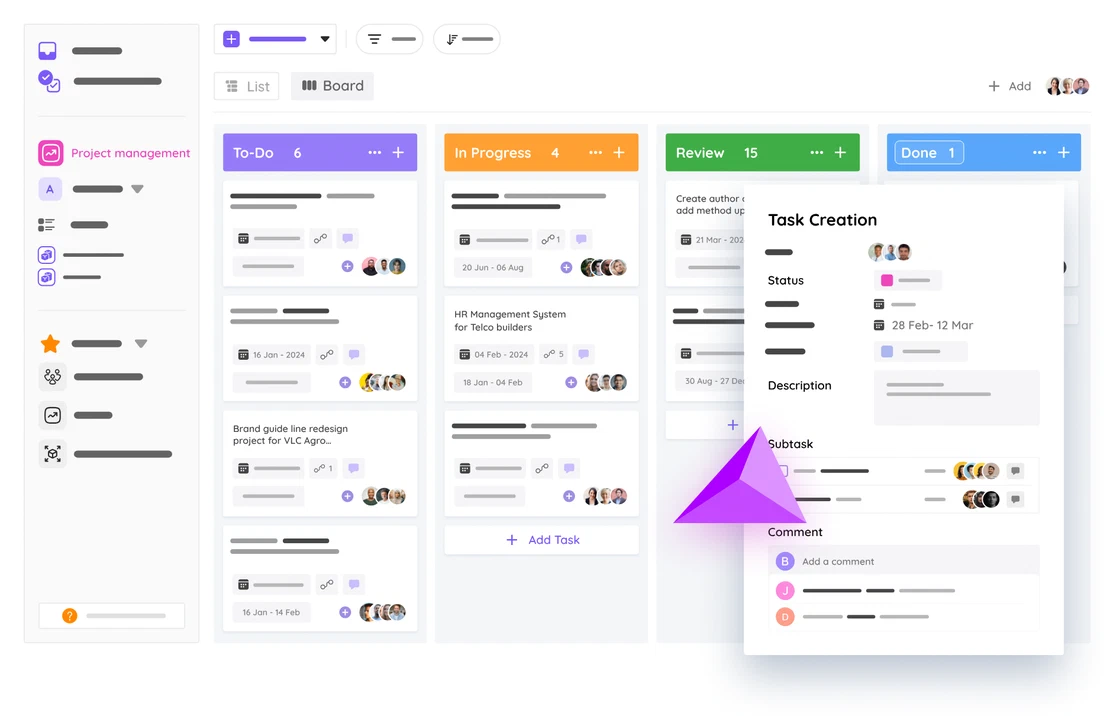
Know your team's real bandwidth
Creative teams tend to assign work on gut feeling. FlowQi shows who is available, who is maxed out and what is at risk, in real numbers.

See how FlowQi brings structure to creative workflows without killing the creativity.
Book a demoCreative operations: frequently asked questions
What is creative operations (CreativeOps)?
Creative operations, often shortened to CreativeOps, is the function of running a creative team like an operation, not an art room. It covers the systems, workflows and tooling that turn briefs into shipped assets: intake, scoping, resource allocation, review and approval flows, asset management, time tracking and performance reporting. The goal is simple, more creative work shipped on time, with less chaos, without burning the team out. Studios and in-house creative departments adopt creative operations the moment workflow-on-Slack stops scaling.
Is FlowQi suitable for small creative teams?
Yes. FlowQi works for freelance designers, small studios and large creative departments. You only pay for what you use, so the platform scales with the team.
Can clients leave feedback directly in FlowQi?
Yes. You can invite clients as external collaborators. They see only what you share and can leave comments and approvals directly on tasks.
Does FlowQi replace tools like Asana or Monday.com?
Yes. FlowQi combines project management, time tracking, CRM, and reporting, so you can replace multiple tools with one platform built for creative work.
How does file versioning work?
Every file uploaded to a task is automatically versioned. You can compare versions side by side and feedback is always tied to the correct version.
Can I track billable hours per client?
Yes. Time tracking is built into every task. You get reports per project, per client, or per team member, ready for invoicing.
What integrations does FlowQi support?
Connect your own AI tools over MCP. Briefs, feedback, time and delivery live inside FlowQi, so most creative teams need fewer integrations than they expect.


Ready to bring structure to your creative process?
Bring briefs, feedback and delivery into one platform.