


CRM system

Every customer. One place.

Customers, contacts, and suppliers, in one place. No more scattered records across tools, inboxes, and spreadsheets.

  • Included for every user
  • Customers, contacts & suppliers
  • Free for your whole team
  • One database for every team
FlowQi client management, one system for all teams
Sound familiar?

Same customer. Six different records.

When a client calls, nobody has the full picture, because it doesn't exist in one place.

Contacts in spreadsheets

Contacts in spreadsheets

You copy-paste names and emails between tools. One typo and a client disappears from your radar.

Follow-ups lost in inboxes

Follow-ups lost in inboxes

Someone promised to follow up. Three weeks later, the client calls to say they went with a competitor.

'Who spoke to them last?'

'Who spoke to them last?'

The account changes hands and nobody knows what was discussed. The client has to explain themselves again.

Duplicate outreach

Duplicate outreach

Two team members reach out to the same contact on the same day. Looks unprofessional. Costs relationships.

Ready to fix your client chaos?

Start free, no credit card required

The work

From first contact to loyal customer

Two steps, in the same customer record.

01

Every team, same customer, one shared database

One record per customer, shared by sales, marketing, support and finance, with the full interaction history attached. No duplicates across tools, inboxes and spreadsheets, and handovers that keep their context.
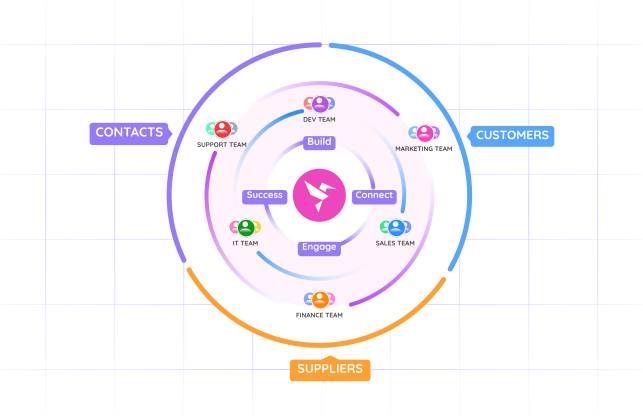
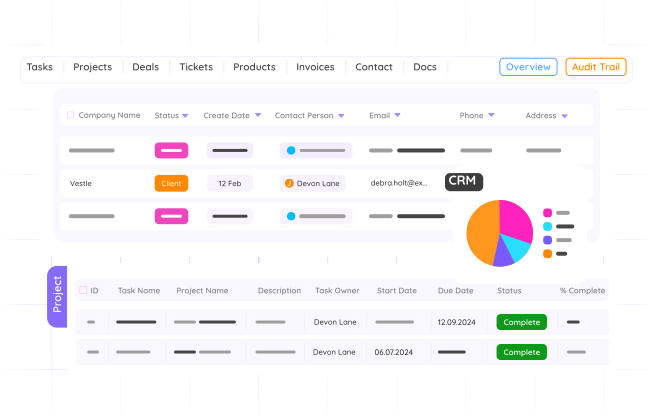
Every team, same customer, one shared database
Start free trial →
02

Never let a follow-up fall through the cracks

Set a follow-up on the client profile itself, so the task stays tied to its context. Due date, owner and priority, with overdue items flagged in the client list.

Never let a follow-up fall through the cracks
Book a demo →
What's in FlowQi's CRM system

Everything your team needs to manage clients, built in

No plugins, no integrations, no extra cost. Client management is a core part of FlowQi.

Complete client profiles

Complete client profiles

Name, company, contact details, tags, and custom fields, everything about a client in one card.

Activity timeline

Activity timeline

Keep notes, contacts, projects and tasks together in one client timeline. Your whole team sees the full history. Email sync is on our roadmap.

Smart search & filters

Smart search & filters

Find any client in seconds. Filter by status, tag, deal stage, or last activity. Save your views.

Team visibility

Team visibility

See who owns which account and who last spoke to a client. No gaps, no duplicate outreach.

Custom fields

Custom fields

Add the fields your business actually needs, contract value, renewal date, industry code, anything.

Follow-up tasks

Follow-up tasks

Set reminders directly on a client profile so tasks stay tied to context. Never drop the ball again.

Pricing model

CRM, projects and tasks are free

Basic is not a trial. It has no end date, and you pay only for what you add.

Basic CRM, projects and tasks, for unlimited users €0 free forever
Core Roles and permissions, multiple workspaces and Hummy AI. Applies to everyone in your workspace. +€25 per user per month
Time & Resources For the people who track hours and get scheduled +€25 per user per month
Billing For the people who send invoices, alongside Time & Resources +€15 per user per month
See all pricing →
Your whole team can run CRM, projects and tasks without paying. Core comes in when you need roles and permissions, or more than one workspace.
FAQ

Common questions about the FlowQi CRM system

What is a CRM system?

A CRM system (Customer Relationship Management) is software that centralises client contacts, deals and communication so teams always have shared context. FlowQi goes a step further by linking clients directly to projects, time tracking and invoicing, one workspace, one source of truth.

How much does a CRM system like FlowQi cost?

The CRM is included in Basic, free for your whole team. CRM and projects are free for your whole team. Core is $25 per user per month for everyone in your workspace. Time & Resources ($25) and Billing ($15) are charged only for the people who use them, on top of Core.

Can I import my existing contacts?

Yes. You can import contacts from a CSV file with a simple field-mapping step, which also works for exports from most other CRMs.

Does FlowQi track emails automatically?

Not yet. Email sync is on our roadmap. Today the client timeline holds your notes, contacts, projects and tasks, so the team still sees the full history in one place.

Can I link clients to projects and invoices?

Yes, that’s FlowQi’s superpower. You can link clients to projects, track billable hours, and generate invoices, all from the same client profile. No copy-pasting between tools.

How does FlowQi compare to standalone CRMs like HubSpot or Pipedrive?

Standalone CRMs cover the sales side and nothing beyond it. For projects, hours and invoices you still need a second tool, so you pay twice and retype the same data between systems every month. FlowQi does the client management and the delivery, in one system. You pay per person, and only for the modules that person actually uses.

Your clients deserve better than a spreadsheet

Manage every customer relationship in one place. Start free, no credit card required.