
What Is PSA Software? Professional Services Automation Explained

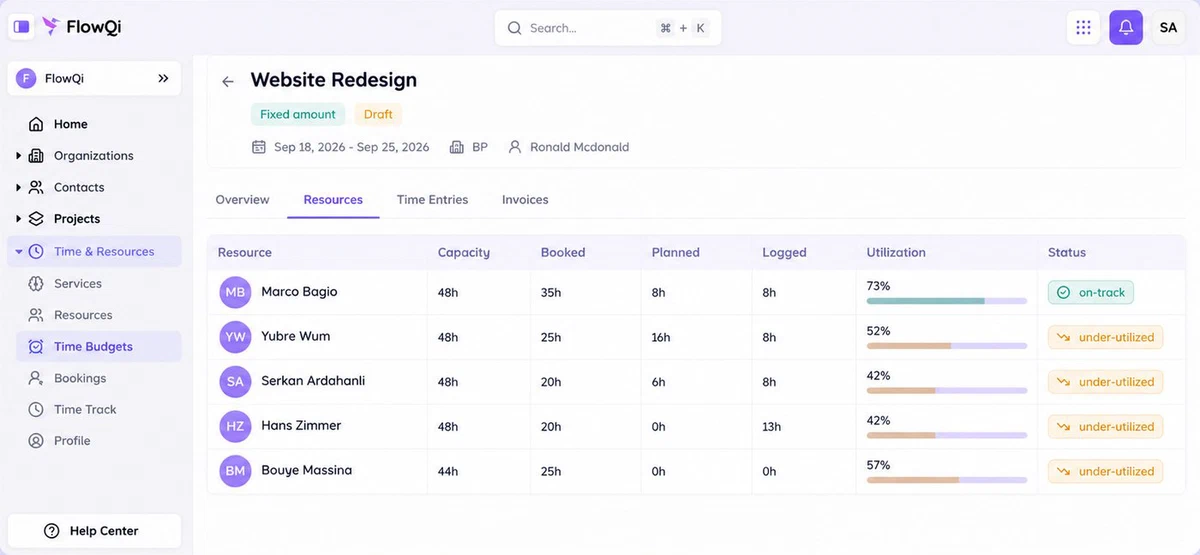
PSA software, short for professional services automation, is one system for the chain a services firm sells: the project, the people booked on it, the hours they log, the budget those hours consume, and the invoice at the end.
On this page:
- What PSA software actually does, in five parts
- Who uses it, and who does not need it
- How it differs from project management software, a CRM and an ERP
- The two symptoms that mean you have outgrown your current tools
- What it costs, and the platforms people compare
What is PSA software?
Professional services automation is software for businesses whose product is their people’s time: agencies, consultancies, IT service providers, engineering firms, law and accounting practices.
Those firms all run the same chain. Work is sold, someone has to deliver it, that person books hours against it, the hours eat a budget, and at the end of the month something has to be invoiced. Every step in that chain can be done in a separate tool, and in most firms it is. PSA software is what you call it when the steps share one set of records instead.
That is the whole idea, and it is worth being precise about it, because the feature list of a PSA platform looks like the feature list of four ordinary tools stacked on top of each other. The difference is not the features. It is that the hours on a project are the same hours on the invoice and the same hours in the margin you report, without anyone copying them across.
What does PSA software do?
| Part | What it answers |
|---|---|
| Projects | What was agreed, what the phases are, what is still open |
| Resource allocation | Who is booked on what, and who has room next month |
| Time tracking | What people actually spent, per client and per project |
| Budgets and billing | What the work was worth, what is billable, what goes on the invoice |
| Reporting | Whether the project made money, and how much of the team’s time was billable |
Two of these carry most of the weight.
Resource allocation is the one firms underestimate. Knowing what happened last month is bookkeeping. Knowing whether next month’s work fits in the hours you have is the thing that stops you either turning down revenue or promising a date you cannot hold. If scheduling is the only part you are missing, a dedicated tool may be enough: see our comparison of resource management software.
Utilisation is the number that connects the rest. It is the share of available hours that is billable, and it is the clearest single measure of whether a services business is healthy. The mechanics are in the utilization rate formula.
Who uses PSA software?
- Agencies, where the same client runs through campaigns, hours and monthly invoices.
- Consultancies, where utilisation and rate per consultant decide the year.
- IT service providers and MSPs, often with tickets and contracts attached, which is why some PSA tools carry a helpdesk.
- Engineering, architecture and legal firms, where billable hours are the unit of sale and budgets are fixed by contract.
Who does not need it: firms that sell products rather than hours, and small teams where one person keeps the whole picture in their head. A freelancer with four clients needs time tracking and an invoice, not a platform.
PSA vs project management software
Project management software answers what needs doing and by when. It is built for the people doing the work: tasks, boards, dependencies, deadlines.
PSA answers what the work is worth. It is built for the people running the firm: is this project inside budget, who is available to staff the next one, which hours are billable, and what can we invoice.
The two overlap on projects and tasks, which is why project tools sell time tracking add-ons and PSA platforms ship a task board. The dividing line is money and capacity. A project tool can tell you a task is late. It cannot usually tell you that being late costs you the margin, or that the person who should fix it is fully booked for three weeks.
PSA vs CRM
A CRM manages the relationship before the work: contacts, opportunities, what you quoted and at what price. PSA manages what happens after it is sold.
They meet at one point, the handover from a won deal to a started project, and that handover is where most of the retyping in a services firm happens. That is why several PSA platforms include a CRM, and why the two terms get mixed up.
The distinction that matters in practice: a CRM can tell you a client is worth 80,000 a year. Only the PSA side can tell you whether delivering that 80,000 cost you 70,000 in hours.
PSA vs ERP
ERP is built around goods: purchasing, inventory, production, and the finance that follows them. PSA is built around billable time.
Large firms sometimes run PSA as a module inside an ERP, which is why you see ERP vendors selling PSA. For a services firm under a few hundred people, an ERP is a heavier answer than the question deserves.
When do you need PSA software?
Two symptoms, and they usually arrive together:
- You find out whether a project was profitable after it has finished. The hours are somewhere, the budget is somewhere else, and the comparison is a spreadsheet someone builds at the end of the quarter.
- You cannot tell who is free next month without asking around. Planning happens in a shared calendar, a whiteboard or somebody’s memory, and it is not connected to what people actually log.
Both have the same cause: the hours, the budget and the schedule live in different tools. That is a problem you can survive with five people and rarely survive with twenty.
A third signal, less obvious: you are quoting new work on gut feel because you do not trust your own numbers on what similar work took last time.
What does PSA software cost?
Platforms that publish a price generally sit somewhere between 10 and 30 per user per month. Three things move the real bill well above the headline:
- Seat minimums. Three to five paid seats is common, and contractors often count as seats.
- The tier that includes invoicing. Time tracking and resourcing are frequently on the first paid plan while invoicing and rate cards sit a tier up.
- Onboarding fees. Several vendors charge a one-off implementation fee, sometimes into the thousands.
The enterprise platforms do not publish prices at all and quote per company after a sales call.
We worked the arithmetic out for a team of 10 on each platform’s own published prices in the best PSA software comparison, including which plan you actually need before you can send an invoice.
Which PSA platforms do people compare?
The names that come up most often, and what each is generally chosen for:
- Scoro, for financial depth in agencies and consultancies.
- Productive, as the all-rounder that publishes its price.
- Kantata and Certinia, for larger firms staffing many projects at once.
- Accelo, for quote-to-cash automation, priced per company.
- BigTime and Teamwork.com, for firms billing from logged hours.
- FlowQi, as the lighter option with a free plan.
The honest summary is that they differ less on features than the marketing suggests, and more on who they are priced for. That is why our comparison is built around what a team of 10 pays rather than a feature grid.
PSA in FlowQi
FlowQi covers the chain without charging the whole team for it:
- Everyone works free on Basic, with CRM, projects and tasks for unlimited users.
- Time & Resources, at 25 per user per month, covers hours, time budgets, capacity planning and utilisation in one module. You add it only for the people who log hours or get scheduled.
- Invoicing, also 25 per user, turns approved hours into an invoice, for the people who send them.
- Core, at 25 per user, adds roles and permissions and private projects when you need them.
Where FlowQi is lighter than the established platforms is financial reporting depth, and it has few public reviews so far. Where it is different is the pricing: no seat minimum, no setup fee, and nothing charged for the colleague who only looks at a project.
See capacity planning and time tracking, or try FlowQi free.