Comparison · Updated

The 6 best Productive alternatives in 2026

Six alternatives to Productive for agencies and service firms, with what a team of 10 pays and where each one fits. FlowQi is our own product, so we say where it falls short too.

Serkan Ardahanli, founder of FlowQi
Short answer

Productive is a strong agency platform and reviewers rate it highly, so most people leave over the terms rather than the product. Below three seats, or when only part of your team tracks time, FlowQi has no minimum and a free plan. Scoro goes deeper on finance. Teamwork.com suits client delivery billed from logged hours. Function Point is built for agencies and publishes a price. Accelo and Kantata quote per company, so expect a sales conversation before you see a number.

All six next to Productive

Price per month for a team of 10 where 3 people track time and 1 sends invoices.

ToolBest forMinimumFree planTeam of 10
FlowQiFree start, pay per moduleNoneYes, Basic€100€75 without invoicing
ScoroAgency suite with deep finance5No, 14-day trial$170$570 on End-to-end
Teamwork.comClient projects billed from hours5 on AccelerateYes, up to 5 users$249.90Accelerate, billed yearly
Function PointBuilt for agencies, price publishedNot publishedNone listed$580plus onboarding fee
AcceloPSA with a guided rolloutNot publishedNone listedOn request
KantataResource forecasting for larger firmsNot publishedNone listedOn request
ProductiveAll-in-one platform for agencies3No, 14-day trial$120$290 with invoicing

List prices checked on 13 and 18 September 2026, monthly billing unless noted, excluding tax, in the currency each vendor publishes to an English-speaking buyer. Function Point adds a one-off onboarding fee. Accelo and Kantata do not publish prices.

Why teams look at something else

Four things that decide the bill, and how FlowQi handles each one.

Three paid seats minimum, and contractors count

Every plan starts at three paid seats, and a freelancer who tracks time is charged the same as an employee. There is no free plan, only a 14-day trial. Until mid-2025 the minimum was one user.

At FlowQi

Basic is free for unlimited users, with CRM, projects and tasks. No minimum, and no trial that runs out.

Invoicing and approvals sit a plan up

Essential covers budgeting, resource planning and time tracking. Invoicing integrations, rate cards, billable time approvals, task dependencies and custom roles all start on Professional, which is more than twice the price.

At FlowQi

Hours, time budgets, capacity planning and utilisation sit together in one module at €25 per user. Invoicing is a second module at €25, for the people who invoice.

Dollars unless you buy from one of five countries

Euro prices are shown only to visitors from Germany, the Netherlands, Croatia, Spain and France. Everyone else, including the UK, Ireland, Belgium, Australia and the US, is quoted in US dollars.

At FlowQi

FlowQi prices in euros: €25 per user per month per module, or €20 each on annual billing.

It renews on its own, at the price of the day

Subscriptions renew automatically. Cancel early and nothing is refunded; you still owe the rest of the term. Renewals are billed at whatever the list price is at that moment, and every plan went up by a dollar per user in February 2026.

At FlowQi

What you pay is on the pricing page: Basic free, and €25 per user per month for each module, only for the people who use it.

The alternatives

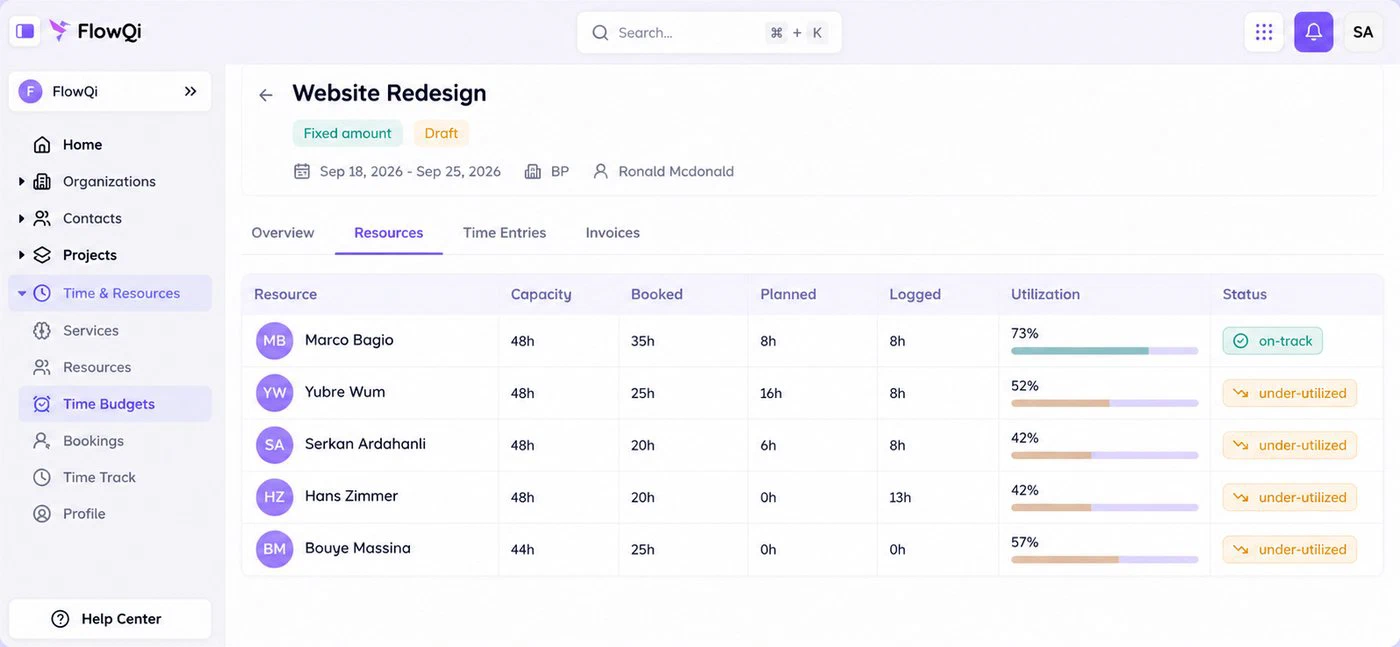
Resource view on a FlowQi project: capacity, booked, planned and logged hours per person, with utilisation

1. FlowQi

Our product

Best when only part of the team tracks time.

  • €100 for a team of 10
  • No minimum
  • Free plan
Choose FlowQi if

you are below three seats, or only part of your team tracks time. Everyone works free on Basic with CRM, projects and tasks. Time & Resources, which covers hours, time budgets, capacity planning and utilisation, is €25 per user for the people who use it, and Invoicing is €25 per user for the people who invoice. For a team of 10 where 3 track time and 1 invoices, that is €100 a month.

Less suited if

you want reporting as deep as Productive's. Profitability per project, per client and per person is what reviewers praise Productive for most, and that is where a younger product shows its age. Roles and permissions, private projects and reporting sit in Core, at €25 per user for the whole team. FlowQi also has few public reviews.

What you get and what it costs

Strong at

  • CRM, projects and tasks free for the whole team.
  • Hours and capacity planning in one module.
  • Invoices built from logged hours, on the free plan too.
  • Prices in euros, with no seat minimum.

Weaker at

  • Less reporting depth than an established platform.
  • Young product with few public reviews.

Prices

  • Basic: free, unlimited users.
  • Time & Resources: €25 per user (€20 billed yearly).
  • Invoicing: €25 per user (€20 billed yearly).
  • Core: €25 per user for the whole team (€20 billed yearly).
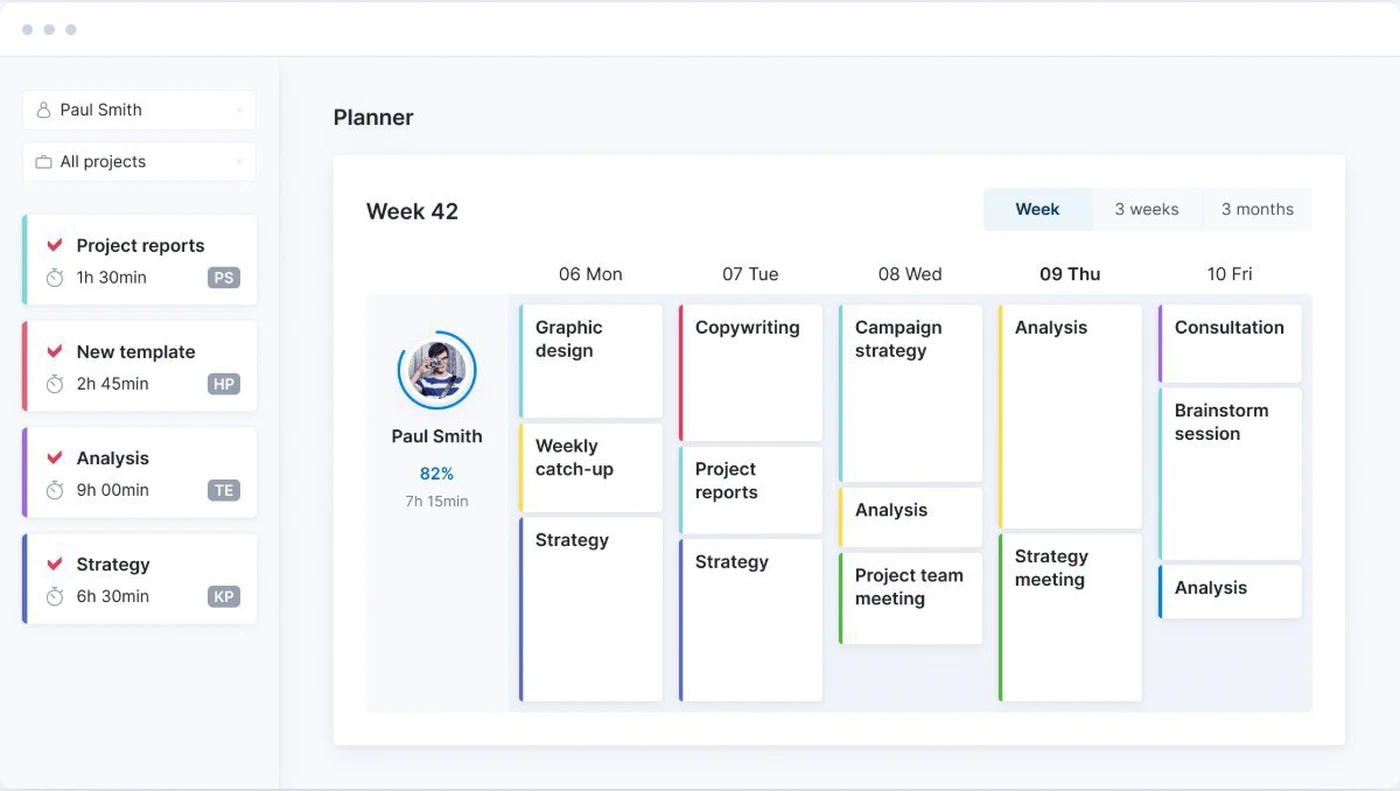
Planner in Scoro: one person's tasks across a week

2. Scoro

Best for quotes, budgets and financial reporting.

  • $170 for a team of 10
  • Minimum 5 users
  • All currencies published
Choose Scoro if

finance is the reason you are switching. Scoro covers quotes, projects, time, resourcing, budgets, invoices and financial reporting, with multiple currencies and a mature reporting layer. Time-billing, which is time tracking plus invoicing, is $17 per user per month, and all eight apps together are $57.

Less suited if

your team is smaller than five, because that is the minimum on every combination. You always buy at least two of the eight apps, time tracking with planning and invoicing together only arrive on the $57 package, and the contract renews automatically unless you give 30 days' notice.

Strengths, weaknesses and prices

Strong at

  • Quotes, projects, time, resourcing and finance in one platform.
  • Mature financial reporting and multiple currencies.
  • Publishes every currency side by side.

Weaker at

  • Five-user minimum and no free plan.
  • Time, planning and invoicing together only on the full package.

Prices

  • Time-billing: $17 per user, time and invoices.
  • Projects & Resources or Quote to Cash: $29.
  • End-to-end: $57, all eight apps.
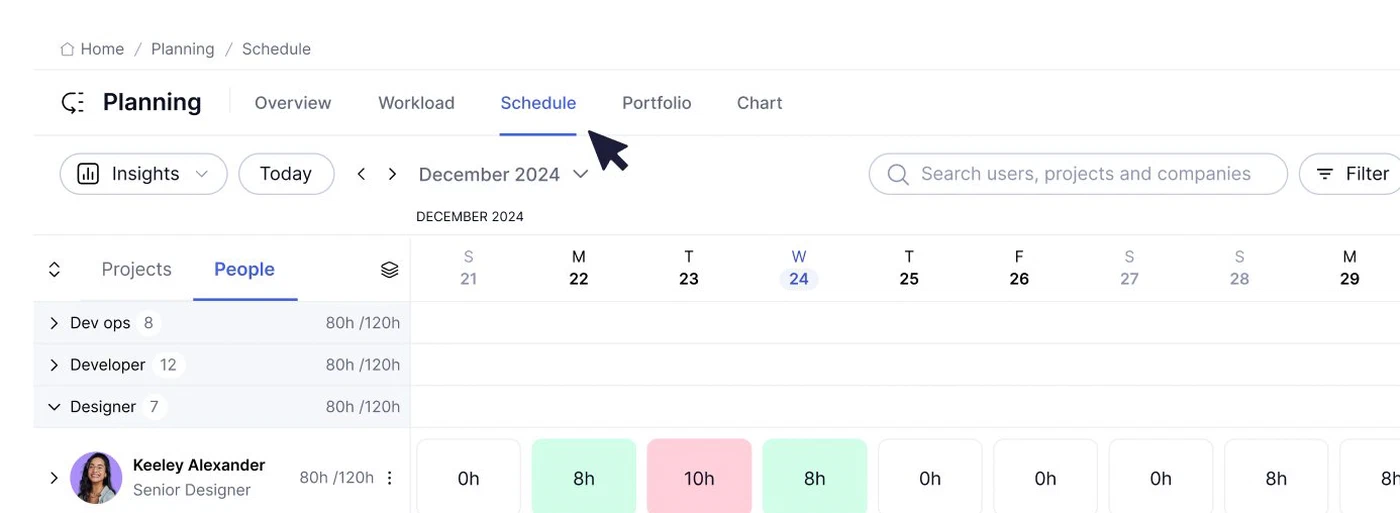
Schedule in Teamwork.com: hours planned per person per day against their capacity

3. Teamwork.com

Best for client delivery billed from logged time.

  • $249.90 for a team of 10
  • Free up to 5 users
  • Prices in dollars
Choose Teamwork.com if

your work is client projects and you bill from the hours your team logs. Basics starts at $9.99 per user per month billed yearly, with a minimum of 3 users. Invoicing from logged time sits on Accelerate, at $24.99 per user billed yearly, with a minimum of 5.

Less suited if

you want quotes and a sales pipeline in the same place. Quotes sit on Optimize, which is priced on request, and the free plan stops at 5 users and 5 projects.

Strengths, weaknesses and prices

Strong at

  • Free plan for up to 5 users and 5 projects.
  • Invoicing from logged time on Accelerate.
  • Built around client work and billable hours.

Weaker at

  • Quotes only on Optimize, priced on request.
  • Minimum of 5 users on Accelerate.

Prices

  • Free: up to 5 users and 5 projects.
  • Basics: $9.99 per user billed yearly, minimum 3.
  • Accelerate: $24.99 per user billed yearly, minimum 5.
  • Optimize and Enterprise: on request.
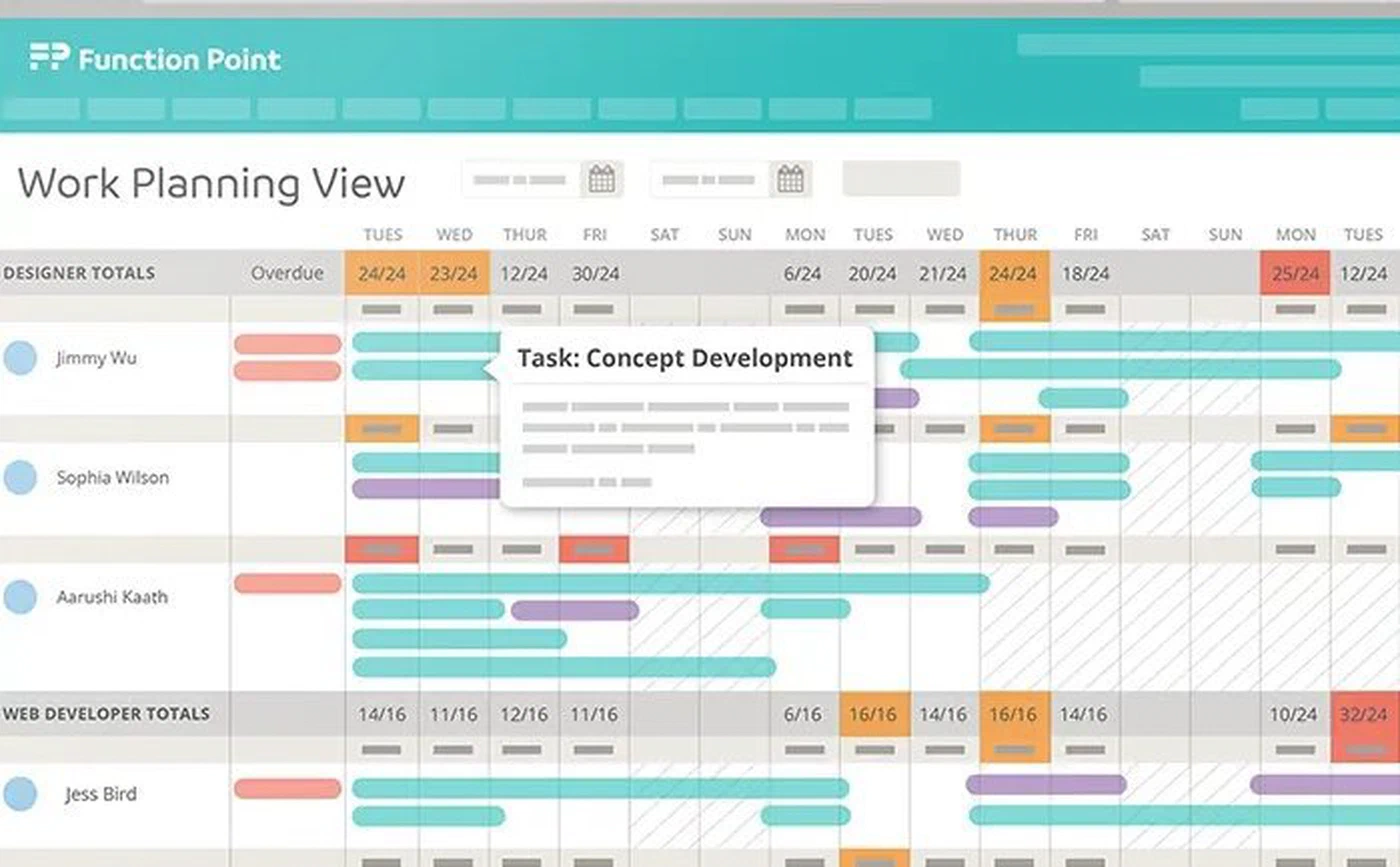
Work planning view in Function Point: planned work per designer per day across a week

4. Function Point

Best agency-specific suite with a published price.

  • $580 for a team of 10
  • Onboarding fee applies
  • Prices in dollars
Choose Function Point if

you want a system built specifically for agencies, with estimates, jobs, time and financials in one place, and a named success manager. Standardize is $58 per user per month, or $53 billed yearly, and includes estimating and invoicing on both plans.

Less suited if

you are cost-sensitive or want to start small. It is the most expensive published price in this list, a one-off onboarding fee applies, and no minimum team size or free plan is published.

Strengths, weaknesses and prices

Strong at

  • Estimates, jobs, time and financials built for agencies.
  • Estimating and invoicing on both plans.
  • Named success manager.

Weaker at

  • Highest published price per user here.
  • One-off onboarding fee on top.

Prices

  • Standardize: $58 per user ($53 billed yearly).
  • Optimize: on request.
  • Onboarding fee: quoted per company.
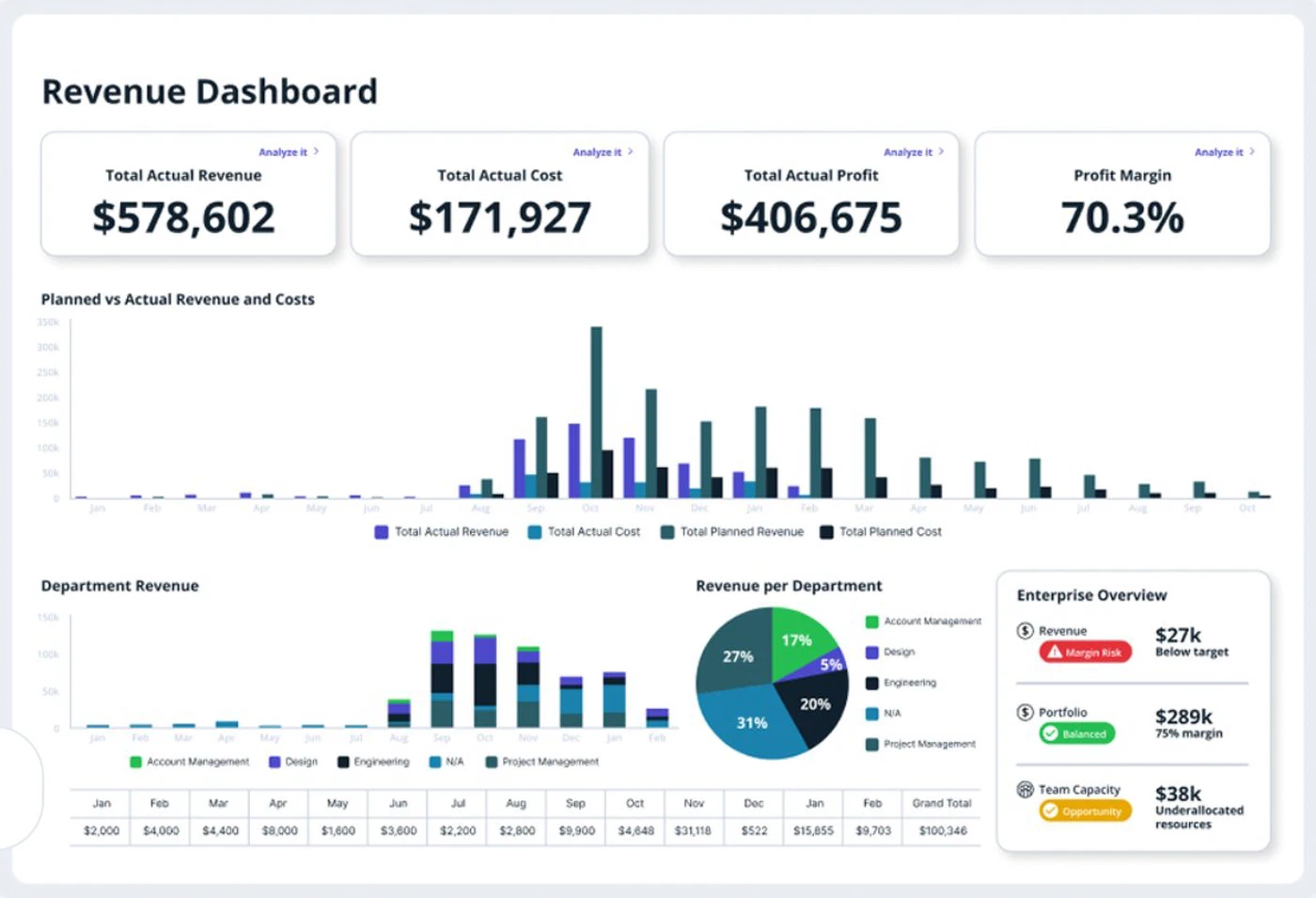
Revenue dashboard in Accelo: actual revenue, cost, profit and margin, with revenue per department

5. Accelo

Best when you want retainers and a guided rollout.

  • Price on request
  • Retainers and tickets
  • Xero and QuickBooks listed
Choose Accelo if

you run retainers and service tickets alongside projects, and you want the vendor to guide the rollout rather than hand you a trial. Accelo covers sales, quotes, projects, retainers, tickets, time and billing, and lists integrations with Xero, QuickBooks Online and Sage Intacct.

Less suited if

you want to compare prices before you talk to anyone. Accelo publishes no price, no minimum team size and no free plan, so the first number arrives through a sales conversation.

Strengths, weaknesses and prices

Strong at

  • Retainers and service tickets alongside projects.
  • Accounting integrations listed.
  • Guided implementation.

Weaker at

  • No published price.
  • No free plan or self-serve start.

Prices

  • All plans: quoted per company.
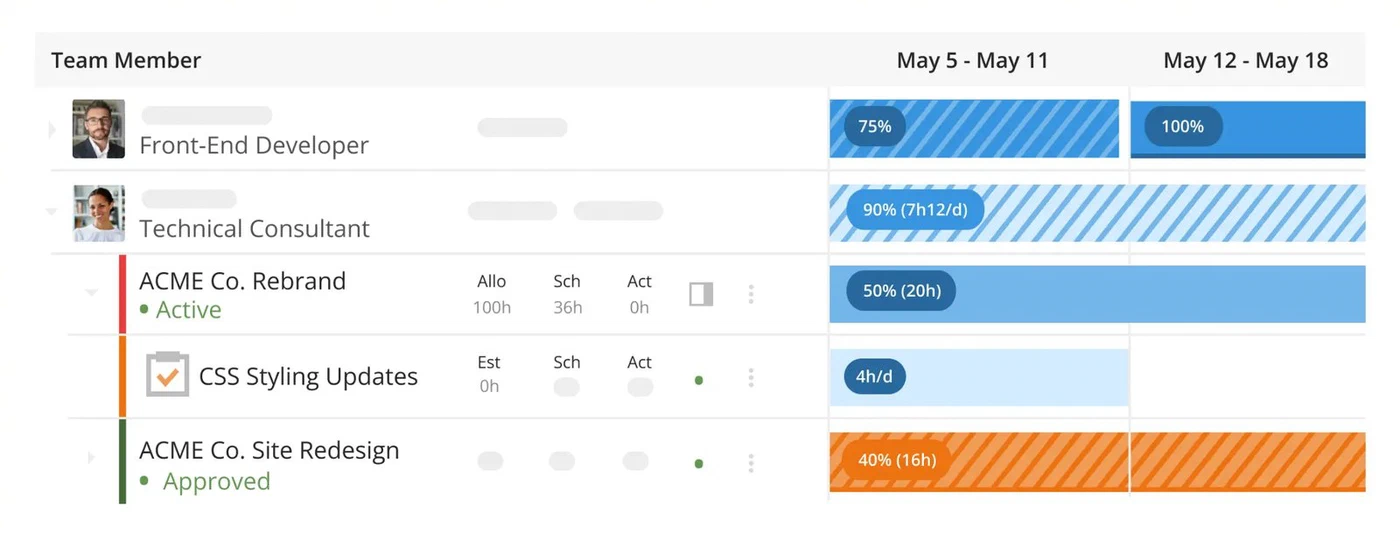
Scheduling across projects in Kantata: allocated, scheduled and actual hours per person per week

6. Kantata

Best for resource forecasting in larger services firms.

  • Price on request
  • Mid-market and up
  • Skills and forecasting
Choose Kantata if

resourcing is the thing you are trying to solve at scale. Kantata is built around it: skills, utilisation, demand against supply, and forecasting which roles you will be short of, across a portfolio rather than a handful of projects.

Less suited if

you are a small agency. Kantata targets mid-market and enterprise services firms, publishes no price and no free plan, and the depth it adds is depth a small team will not use.

Strengths, weaknesses and prices

Strong at

  • Skills inventory and resource forecasting.
  • Supply and demand planning across a portfolio.
  • Built for larger services organisations.

Weaker at

  • No published price.
  • Heavy for a small agency.

Prices

  • All plans: quoted per company.

Frequently asked questions

What is the best Productive alternative for a small agency?

Below Productive's three-seat minimum, FlowQi is the one with no minimum: Basic is free for unlimited users, and you add Time & Resources or Invoicing at €25 per user only for the people who use them. If finance is the reason you are switching, Scoro goes deeper, from $17 per user with a five-user minimum. For client work billed from logged hours, Teamwork.com has a free plan up to 5 users.

Does Productive have a free plan?

No. Productive offers a 14-day trial, and every plan requires at least three paid seats. Contractors and freelancers who track time are charged the same as employees. Until mid-2025 the minimum was one user. Among the alternatives, FlowQi Basic is free for unlimited users with no end date, and Teamwork.com has a free plan for up to 5 users and 5 projects.

What does Productive cost for a team of 10?

Essential is $12 per user per month, or $10 billed yearly, so $120 a month for 10 people. Invoicing, rate cards and billable time approvals start on Professional at $29 per user, so $290 for that team. Above 50 users the Professional price is replaced by a sales conversation. Prices checked on 18 September 2026.

Why does Productive show me euros instead of dollars?

Productive shows euro prices only to visitors from Germany, the Netherlands, Croatia, Spain and France. Everyone else, including the UK, Ireland, Belgium, Australia and the US, is quoted in US dollars: $12 per user per month for Essential and $29 for Professional, or $10 and $25 on annual billing. So the price you see depends on where you are buying from.

Why do teams leave Productive?

Usually the terms rather than the product, because reviewers rate the platform highly. The three-seat minimum with contractors counted, invoicing and approvals sitting a plan up, automatic renewal at whatever the list price is that day, and a mobile app rated well below the platform itself. On setup, the recurring comment is that it takes time to learn and that you work the way Productive is designed to work.

Which Productive alternatives publish their prices?

FlowQi, Scoro, Teamwork.com and Function Point publish prices. Accelo and Kantata do not: both quote per company based on your size and needs, so the first number comes out of a sales conversation.

Can I move from Productive to FlowQi?

Yes. FlowQi imports contacts, organisations and projects from CSV files. Decide beforehand which other Productive data you need to keep, such as invoices, budgets or time entries, because those are not part of that import.

Start free with your whole team

CRM and projects free for everyone. Time & Resources and Billing only for the people who use them.

How we compared: prices come from each vendor's own pricing page, checked on 13 and 18 September 2026, for a team of 10 where 3 people track time and 1 sends invoices. Where a vendor sets prices by country, we quote what an English-speaking buyer is shown. Screenshots of other products come from the vendors' own websites.