Comparison · Updated

The 7 best resource management tools for agencies and consultancies in 2026

Seven tools that answer the question a services firm asks every Monday: who is booked, who has room, and did last week go the way we planned it. Compared on what a team of 10 actually pays, which is rarely the advertised price, because seat minimums and timesheet tiers move it. FlowQi is our own product, so we say where it loses too.

Serkan Ardahanli, founder of FlowQi
Short answer

If all you need is a shared schedule, Resource Guru does it for $80 a month for ten people with timesheets included, and nothing on this list is simpler. Float is the polished scheduler at $120. Productive costs the same and adds budgets and profitability, which makes it the best value once money enters the picture. Runn plans furthest ahead, but its plans start at 20 seats, so a team of 10 pays $220. Teamwork.com and Scoro are full platforms with five-seat minimums. FlowQi is $250 when all ten people are scheduled and $150 when six are, because everyone else keeps working free with the CRM and projects the schedule is built on.

All seven side by side

Price per month for a team of 10 where everyone is scheduled and logs hours, so planned and actual can be compared.

ToolBest forMinimumFree planTeam of 10
FlowQiSchedule, hours and clients in oneNoneYes, Basic$250$150 when 6 are scheduled
Resource GuruThe simple shared scheduleNoneNo, 30-day trial$80$50 without timesheets
FloatThe polished scheduler, fair on seatsNoneNo, 30-day trial$120$70 without time tracking
ProductiveScheduling plus budgets and profit3No, 14-day trial$120Budgets included
RunnPlans furthest ahead, from 20 seats20No, 30-day trial$22020-seat minimum applies
Teamwork.comClient delivery with capacity built in5Yes, 5 users, 5 projects$249.90Billed yearly
ScoroDeepest on finance, priced to match5No, 14-day trial$290Projects & Resources

List prices checked on 20 September 2026 on each vendor's own pricing page, excluding tax, monthly billing unless noted. For each tool this is the cheapest plan that includes both scheduling and timesheets, so several sit above their advertised entry price. Runn is priced at its 20-seat minimum. Teamwork.com is shown at yearly billing, the only dollar figure it publishes to us. Productive and Teamwork.com set prices by country; we quote what an English-speaking buyer is shown.

What to check before you buy

Four things that decide the bill and the fit, and how FlowQi handles each one.

Seat minimums hit small teams hardest

The per-seat price means little until you know the minimum. Runn's plans start at 20 resource seats, so ten people pay for twenty. Scoro and Teamwork.com Accelerate start at five, Productive at three. For a team of 10 that is the difference between $110 and $220 at Runn.

At FlowQi

No minimum. One person can be scheduled for $25, and the other nine work free on Basic.

A schedule without timesheets is half the picture

Planning who does what is only useful if you later see what actually happened. Resource Guru's entry plan, Float Starter and Runn Lite all schedule people but leave timesheets to the tier above, so comparing planned against actual costs $3 to $5 more per person than the headline.

At FlowQi

Scheduling and hours live in the same module at the same price, so planned against logged is one view rather than an upgrade.

You pay for people who are never scheduled

Most platforms charge for every user in the workspace, including the account manager who only looks at the plan. Float is the honest exception among the schedulers: it charges per scheduled person and lets guests look for free.

At FlowQi

Everyone works free on Basic with CRM, projects and tasks. Time & Resources is charged only for the people who are scheduled or log hours.

A scheduler does not know your clients

Resource Guru, Float and Runn are built to do one thing well, which means the client, the project budget and the invoice live somewhere else. Every connection between them is an integration to maintain, and every difference between them is a meeting.

At FlowQi

The schedule sits on the same client and project records as the CRM and the hours, so a won deal becomes a project people can be planned on without retyping it.

The tools

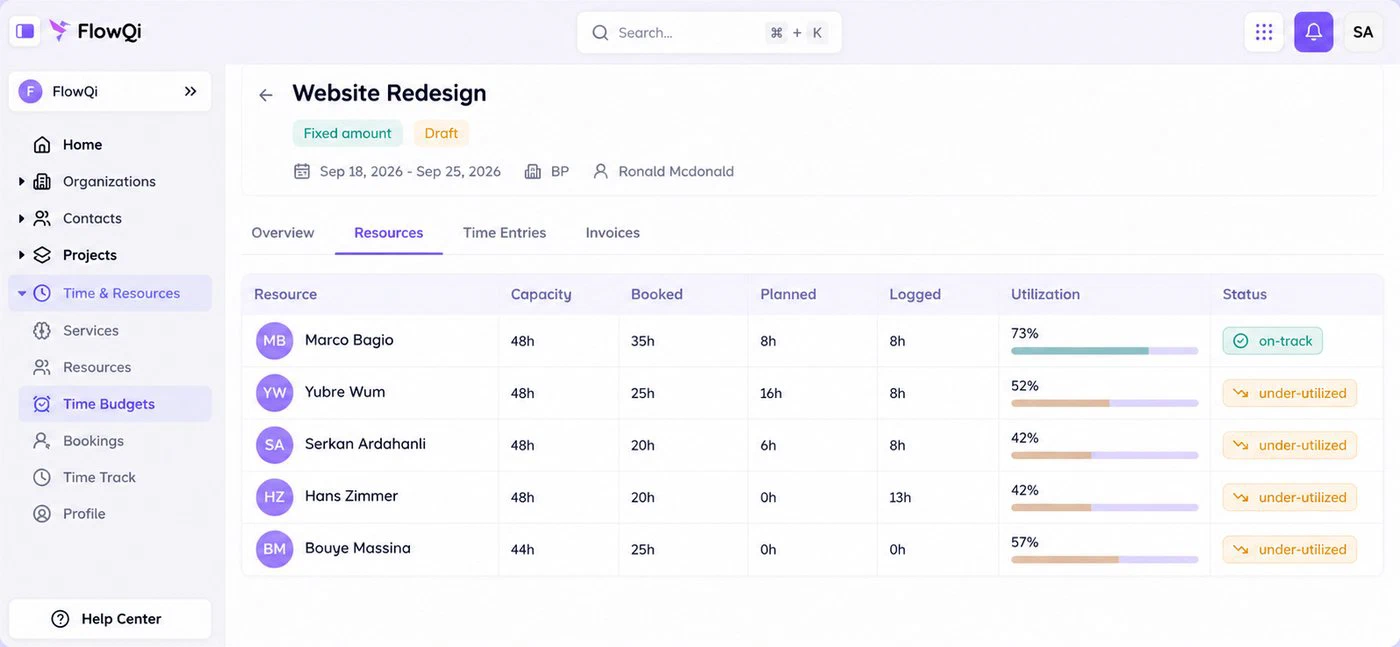
The resource view on a FlowQi project: capacity, booked, planned and logged hours per person, with utilisation and an on-track or under-utilised status

1. FlowQi

Our product

Best when only part of your team is scheduled.

  • $250 when all 10 are scheduled
  • No minimum
  • Free plan
Choose FlowQi if

the schedule should sit on top of the clients and projects you already run. In FlowQi you see capacity, planned and logged hours and utilisation per person, per project, next to the time budget those hours count against. Everyone works free on Basic with CRM, projects and tasks, and Time & Resources is $25 per user for the people who are scheduled or log hours. Schedule six of your ten and it is $150 a month.

Less suited if

you want a dedicated scheduler and nothing around it. When all ten people are scheduled, Resource Guru and Float do that job for a third to a half of the price, and Runn goes deeper on tentative projects and saved scenarios. FlowQi also has few public reviews so far.

What you get and what it costs

Strong at

  • CRM, projects and tasks free for the whole team.
  • Capacity, planned, logged and utilisation in one view.
  • Time budgets per project, with hours counted against them.
  • No seat minimum and no setup fee.

Weaker at

  • Priced above dedicated schedulers if everyone is scheduled.
  • Less scenario planning than Runn.
  • Young product with few public reviews.

Prices

  • Basic: free, unlimited users.
  • Time & Resources: $25 per user ($20 billed yearly).
  • Invoicing: $25 per user ($20 billed yearly).
  • Core: $25 per user for the whole team ($20 billed yearly).
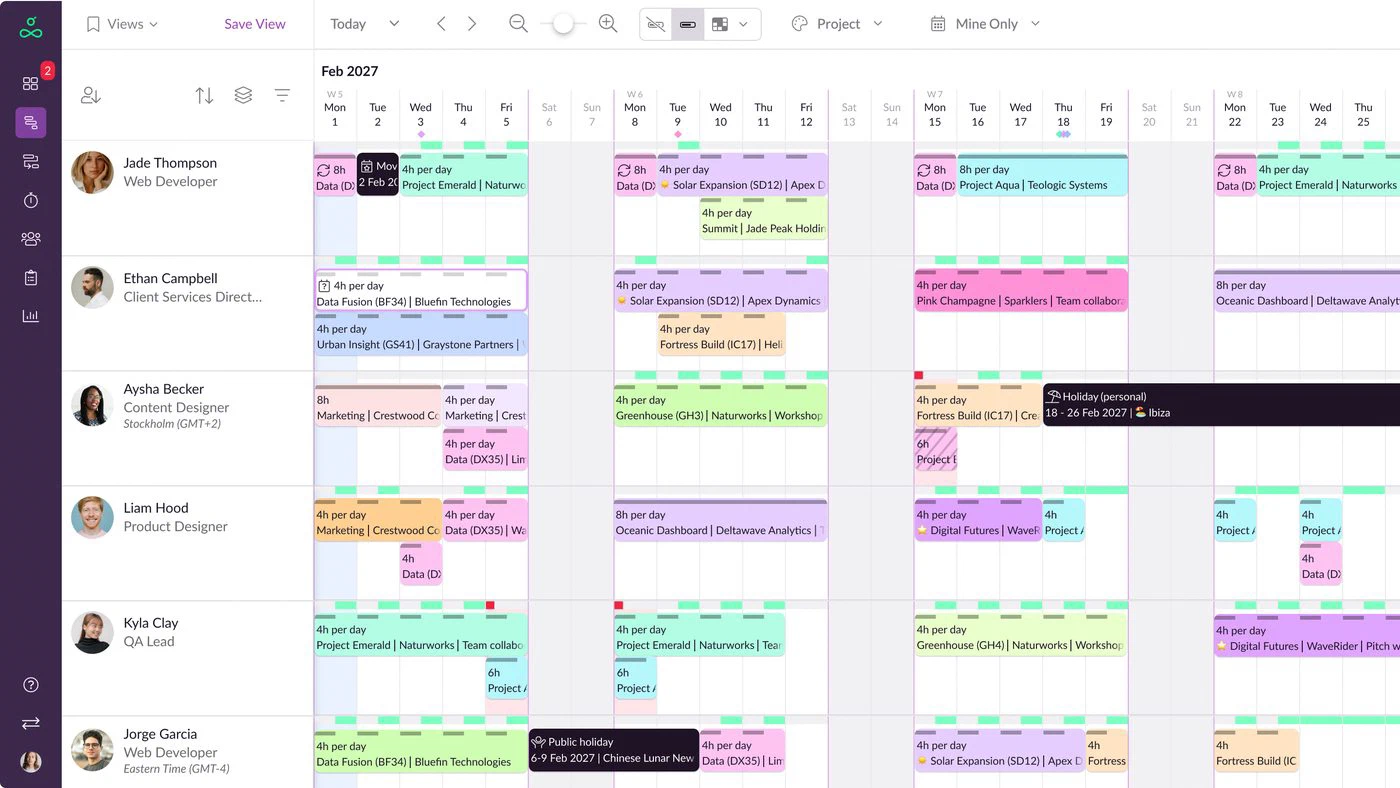
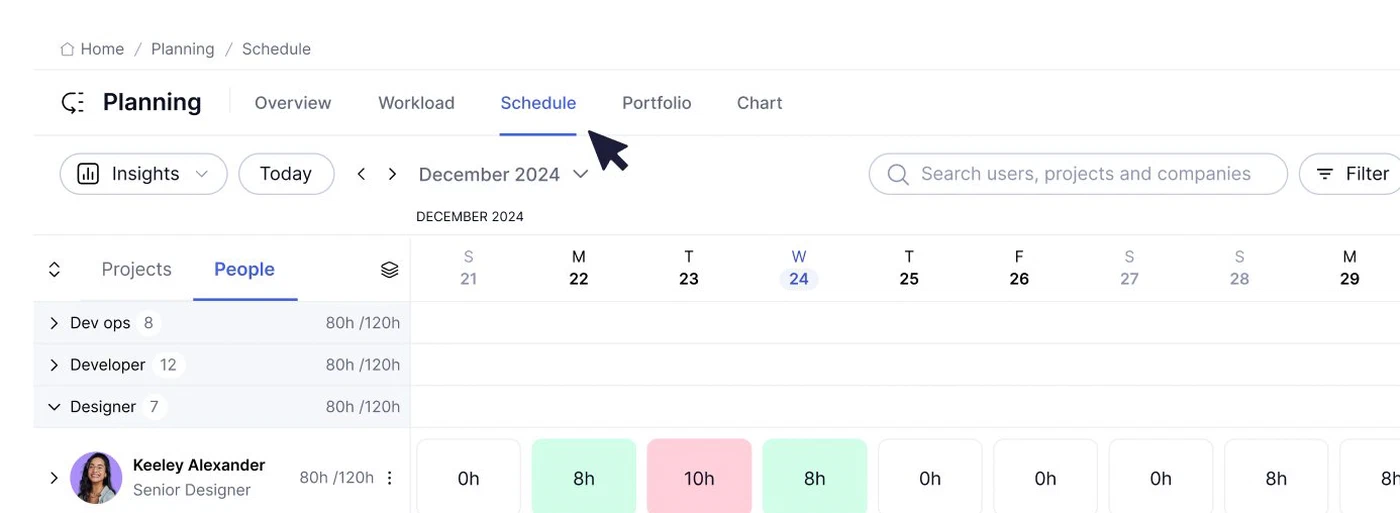
The Resource Guru schedule: people down the side, days across the top, bookings per project with time off and public holidays marked

2. Resource Guru

Cheapest way to schedule a team and still log hours.

  • $80 for a team of 10
  • No seat minimum
  • Rooms and equipment at half price
Choose Resource Guru if

you want everyone to see who is booked, without buying a platform. Blackbelt at $8 a person includes timesheets and customisable reports; Grasshopper at $5 does the schedule alone. It also books things that are not people, such as rooms and equipment, at half the per-person rate, which almost nothing else here does.

Less suited if

money is part of the question. There are no project budgets, no rates and no invoicing, so whether the plan was profitable is answered somewhere else. Approval workflows sit on Master at $12 a person.

Strengths, weaknesses and prices

Strong at

  • The easiest schedule on this list to pick up.
  • Timesheets and reports from $8 a person.
  • Books rooms and equipment as well as people.

Weaker at

  • No budgets, rates or invoicing.
  • Approval workflow only on Master.

Prices

  • Grasshopper: $5 per person ($4.16 billed yearly).
  • Blackbelt: $8 per person ($6.67 billed yearly).
  • Master: $12 per person ($10 billed yearly).
  • Enterprise: on request.
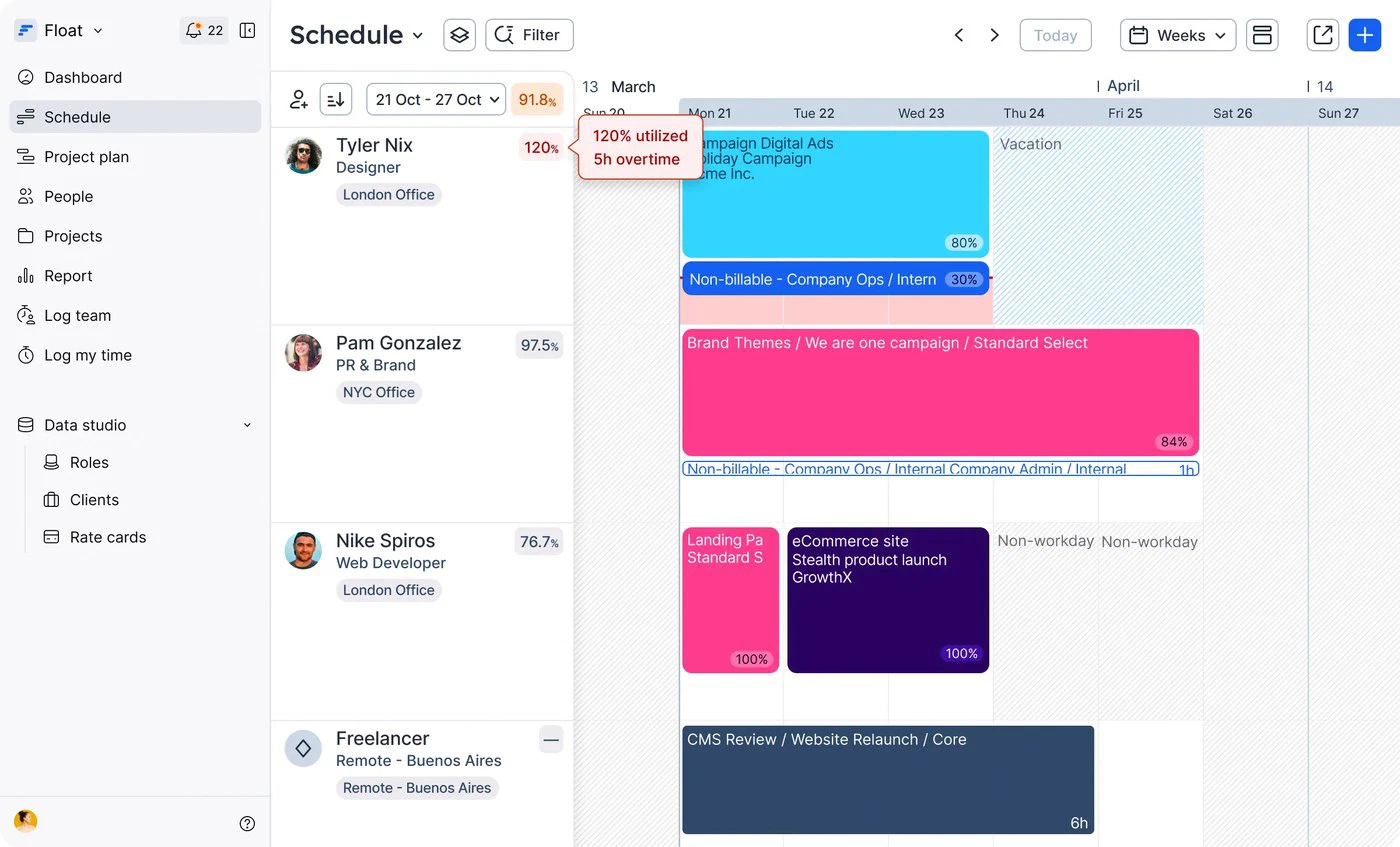
The Float schedule: bookings per person per day, with one person flagged at 120 percent utilised and 5 hours of overtime

3. Float

Best dedicated scheduler for agencies.

  • $120 for a team of 10
  • Pay per scheduled person
  • Guests look for free
Choose Float if

scheduling is the job and you want it done well. Pro at $12 per scheduled person adds time tracking, project cost estimates and margin tracking to the schedule; Starter at $7 is the schedule alone. Float only charges for people who are actually scheduled, and guests can view the plan for free, which is the fairest seat model among the schedulers.

Less suited if

you need the invoice or the client record in the same place. Float estimates cost and margin but does not invoice, and it is not where your CRM lives. Annual billing is cheaper, but Float does not print the yearly price on its pricing page.

Strengths, weaknesses and prices

Strong at

  • Charges per scheduled person, guests free.
  • Time tracking and margin tracking on Pro.
  • Widely used by agencies, polished to use.

Weaker at

  • No invoicing.
  • Time tracking only on Pro.

Prices

  • Starter: $7 per scheduled person.
  • Pro: $12 per scheduled person.
  • Enterprise: on request.
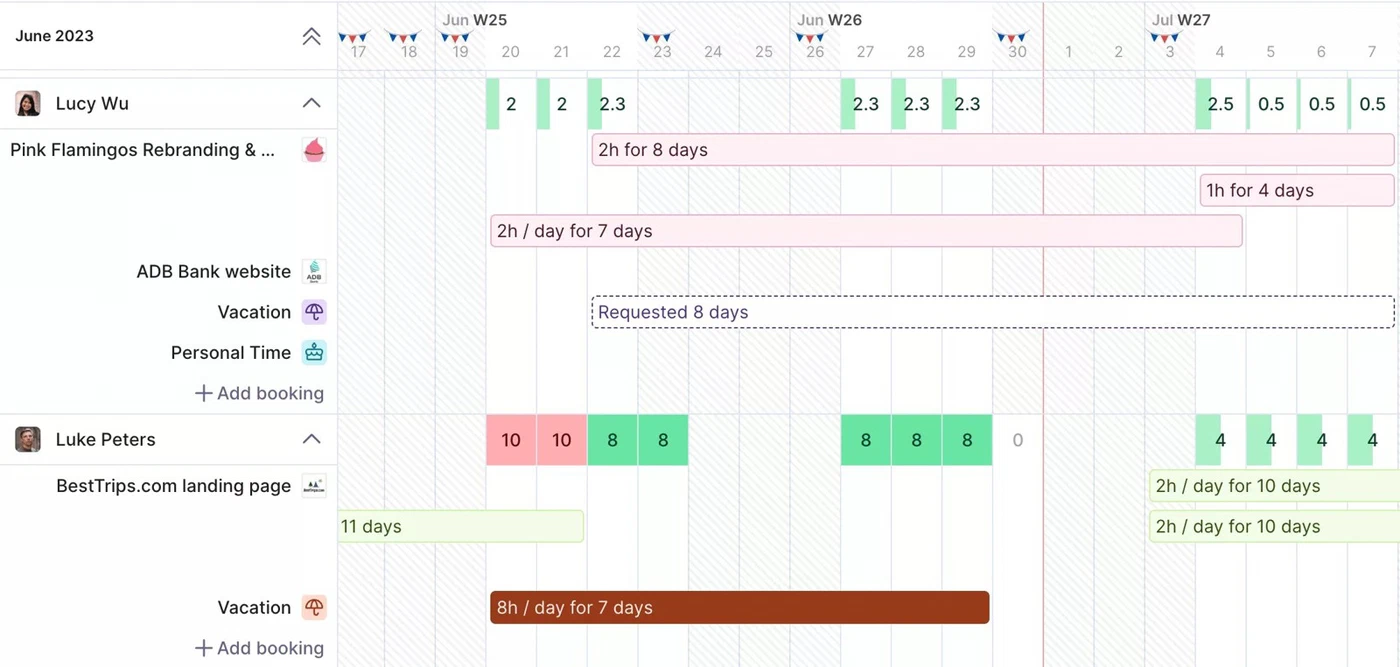
Capacity planning in Productive: bookings per person per day, with overbookings marked in red

4. Productive

Best value once budgets and profitability matter.

  • $120 for a team of 10
  • Minimum 3 seats
  • Budgeting on the first plan
Choose Productive if

you want to know not just who is booked but whether the work makes money. Essential at $12 a user, or $10 billed yearly, includes resource planning, time tracking and budgeting on the first paid plan, for the same money Float charges for scheduling and time alone.

Less suited if

you are under three people, or you need invoicing, which starts on the Professional plan. Every plan needs three paid seats, and Productive prices by country, so check the pricing page from where you are.

Strengths, weaknesses and prices

Strong at

  • Resource planning, time and budgets on the first plan.
  • Profitability per project, client and person.
  • Support that reviewers rate highly.

Weaker at

  • Three-seat minimum.
  • Invoicing only on Professional.

Prices

  • Essential: $12 per user ($10 billed yearly).
  • Professional: adds invoicing and rate cards.
  • Ultimate: on request.
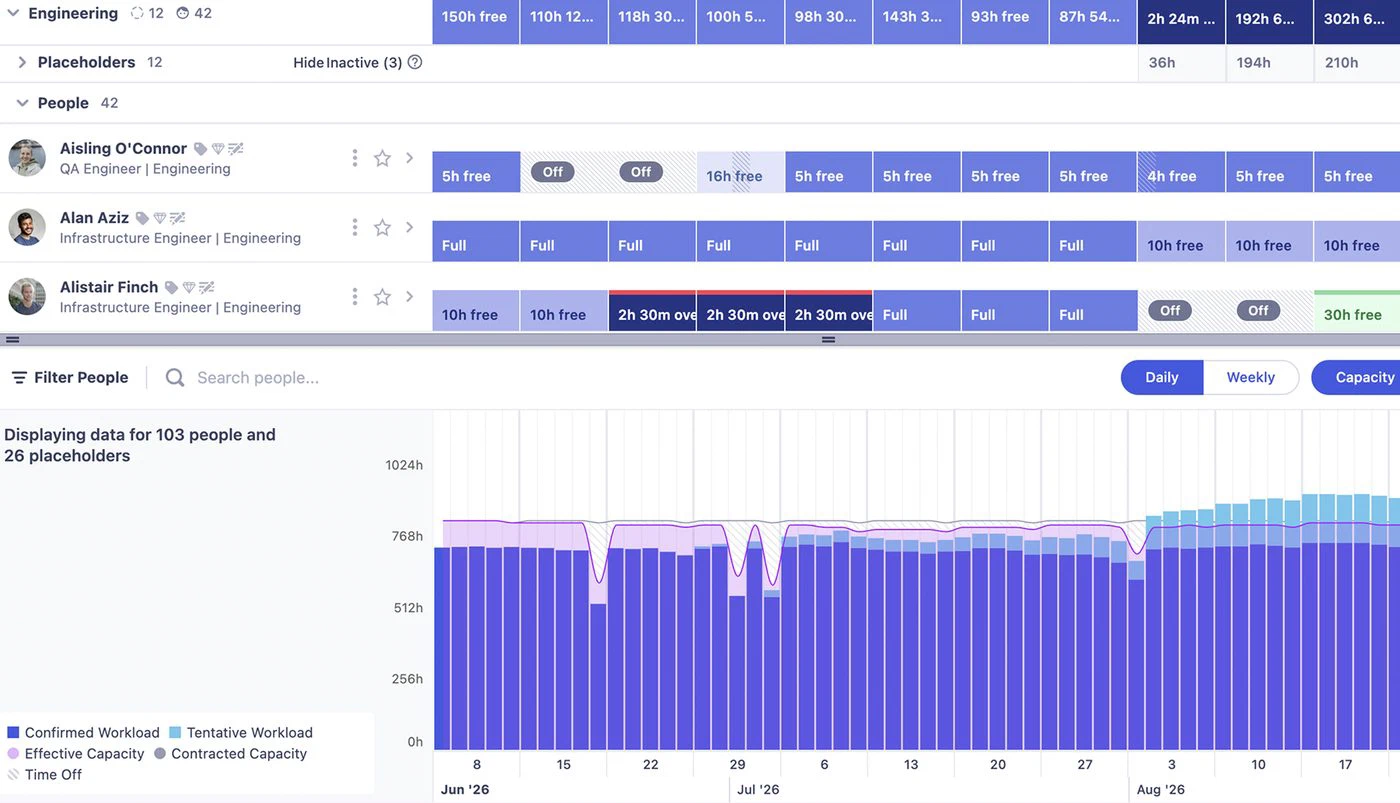
The Runn people planner: free and full days per person, above a chart of confirmed and tentative workload against capacity

5. Runn

Best for forecasting capacity months out.

  • $220 for a team of 10
  • Plans start at 20 seats
  • Tentative projects and scenarios
Choose Runn if

you plan in quarters rather than weeks. Runn is built around the question of whether the pipeline fits the people: tentative projects, placeholders for hires you have not made, saved scenarios, and capacity and utilisation charts on every plan. Standard at $11 a seat adds timesheets.

Less suited if

you are a small team. Runn's plans start at 20 resource seats, so ten people pay for twenty: $220 a month on Standard, or $140 on Lite without timesheets. That makes it the most expensive dedicated scheduler here for a team this size, and the best value at forty.

Strengths, weaknesses and prices

Strong at

  • Tentative projects, placeholders and saved scenarios.
  • Project financials on every plan.
  • Capacity and utilisation charts throughout.

Weaker at

  • 20-seat minimum.
  • Timesheets only from Standard.

Prices

  • Lite: $7 per resource seat, minimum 20.
  • Standard: $11 per resource seat, minimum 20.
  • Advanced: on request.
Workload planning in Teamwork.com: capacity per person per day across the team

6. Teamwork.com

Best for client delivery billed from logged hours.

  • $249.90 for a team of 10
  • Minimum 5 seats
  • Invoicing included
Choose Teamwork.com if

you run client projects and want workload, time budgets and invoicing in the tool the team already works in. Accelerate at $24.99 a user billed yearly includes workload and live capacity planning, time budgets, retainers and client invoices built from logged time.

Less suited if

capacity planning is all you are after. It first appears on Accelerate, which needs five seats, and scheduling by role or skill waits for Optimize, priced on request. Monthly billing costs more than the yearly figure shown, and Teamwork.com prices by country.

Strengths, weaknesses and prices

Strong at

  • Workload, time budgets and invoicing on one plan.
  • Free plan for up to 5 users and 5 projects.
  • Built for client work.

Weaker at

  • Capacity planning only from Accelerate.
  • Five-seat minimum on that plan.

Prices

  • Free: $0, up to 5 users and 5 projects.
  • Basics: $9.99 per user billed yearly, minimum 3.
  • Accelerate: $24.99 per user billed yearly, minimum 5.
  • Optimize and Enterprise: on request.
The Scoro planner: bookings per person with utilisation

7. Scoro

Best when utilisation has to tie to revenue.

  • $290 for a team of 10
  • Minimum 5 users
  • Forecasts utilisation
Choose Scoro if

resource planning is one part of running the whole firm on one system. Projects & Resources at $29 a user combines the planner with projects and time tracking, and Scoro is the tool reviewers pick for forecasting utilisation against revenue.

Less suited if

you want to start small or keep it simple. Every package needs five users, resource planning is not in the $17 entry package, and invoicing takes you to a different combination or to the top package. Annual billing brings 13 to 17 percent off.

Strengths, weaknesses and prices

Strong at

  • Utilisation and revenue forecasting.
  • Financial reporting depth.
  • One system for the whole firm.

Weaker at

  • Five-user minimum.
  • Resource planning not in the entry package.
  • Packages take working out.

Prices

  • Time-billing: $17 per user, minimum 5.
  • Projects & Resources: $29 per user, minimum 5.
  • Quote to Cash: $29 per user, minimum 5.
  • End-to-end: $57 per user, minimum 5.

Frequently asked questions

What is resource management software?

Software that shows who is working on what, who has room, and whether upcoming work fits the people you have. In a services firm the resource is people's time, so the core is a schedule of people against projects, with capacity, time off and utilisation on top. The better tools also record the hours actually worked, so you can compare the plan with what happened.

What are the top 10 resource management software tools?

The seven compared here are Resource Guru, Float, Runn, Productive, Teamwork.com, Scoro and FlowQi, chosen because they publish prices and suit agencies and consultancies. The names that complete most top-ten lists are Kantata, Smartsheet, monday.com, Celoxis, Saviom and Microsoft Project, which lean towards larger organisations and mostly quote on request.

What does resource management software cost for a team of 10?

With scheduling and timesheets together, on each vendor's own published prices: Resource Guru $80 a month, Float $120, Productive $120, Runn $220 because its plans start at 20 seats, Teamwork.com $249.90 billed yearly, and Scoro $290. FlowQi is $250 when all ten are scheduled and $150 when six are, since unscheduled colleagues work free. Prices checked in September 2026.

Which resource management software is best for a small business?

Look at seat minimums first. Resource Guru and Float have none, which makes them the natural start for a small team. Productive needs three seats, Scoro and Teamwork.com Accelerate five, and Runn's plans start at 20. FlowQi has no minimum and a free plan for the whole team, with scheduling charged per person who is scheduled.

Is there free resource management software?

None of the dedicated schedulers has a free plan; Resource Guru, Float and Runn offer 30-day trials. Teamwork.com has a free plan for 5 users and 5 projects, but capacity planning starts on its paid Accelerate plan. FlowQi Basic is free for unlimited users with CRM, projects and tasks, and scheduling is added per person. Most small teams that want free end up in a spreadsheet, which works until two people edit it at once.

Can Jira be used for resource management?

Partly. Jira tracks work, and capacity planning across teams sits in its Plans feature on the Premium tier, with marketplace apps such as Tempo filling the gaps. It is built around sprints and software teams rather than around scheduling billable people against client projects, so services firms usually pair it with a scheduler rather than replace one.

What is the best software for human resource management?

That is a different category. Human resource management software handles hiring, contracts, payroll and leave. Resource management software, the subject of this page, schedules people's time across projects. The two meet at time off: a good scheduler knows when someone is on leave, but it does not run your payroll.

Does Office 365 have a project management tool?

Yes. Microsoft Planner comes with Microsoft 365 for task planning, and resource management features such as capacity and utilisation views sit in Microsoft's paid project plans on top of it. It suits organisations already standardised on Microsoft; agencies usually find the dedicated tools on this page quicker to adopt.

Start free with your whole team

CRM and projects free for everyone. Time & Resources and Billing only for the people who use them.

How we compared: prices come from each vendor's own pricing page, checked on 20 September 2026. The scenario is a team of 10 where everyone is scheduled and logs hours, because a plan you cannot compare with what happened is only half a tool. For each vendor we took the cheapest plan that includes both, and applied its seat minimum, which is why Runn is priced at 20 seats. Where a vendor sets prices by country, we quote what an English-speaking buyer is shown, and Teamwork.com appears at yearly billing because that is the dollar figure it publishes. Screenshots of other products come from the vendors' own websites.

Sources