Comparison · Updated

The 7 best PSA software platforms in 2026

PSA software runs the chain a services firm sells: the quote, the project, the hours your team logs, who is booked next month, and the invoice at the end. Seven platforms compared on what a team of 10 pays and where each one fits. FlowQi is our own product, so we say where it falls short too.

Serkan Ardahanli, founder of FlowQi
Short answer

If only part of your team tracks time, FlowQi charges for those people and leaves the rest on a free plan. Productive is the best-reviewed all-rounder and publishes its price. Scoro goes deepest on finance. Teamwork.com suits client delivery billed from logged hours, and has a free plan up to five people. Function Point is built for agencies and publishes a price. Accelo and Kantata quote per company, so budget for a sales conversation before you see a number.

All seven side by side

Price per month for a team of 10 where 3 people track time and 1 sends invoices.

ToolBest forMinimumFree planTeam of 10
FlowQiFree start, pay per moduleNoneYes, Basic€100€75 without invoicing
ProductiveAll-in-one platform for agencies3No, 14-day trial$120$290 with invoicing
ScoroDeepest on finance5No, 14-day trial$170$570 on End-to-end
Teamwork.comClient projects billed from hours5 on AccelerateYes, up to 5 users$249.90Accelerate, billed yearly
Function PointBuilt for agencies, price publishedNot publishedNone listed$580plus onboarding fee
AcceloRetainers and tickets alongside projectsNot publishedNone listedOn request
KantataResource forecasting at scaleNot publishedNone listedOn request

List prices checked on 13 and 18 September 2026, monthly billing unless noted, excluding tax, in the currency each vendor publishes to an English-speaking buyer. Function Point adds a one-off onboarding fee. Accelo and Kantata do not publish prices.

What to check before you buy

Four things that decide the bill and the fit, and how FlowQi handles each one.

You pay for everyone, not for the people who use it

Most PSA platforms charge per seat for your whole workspace, and several set a minimum: three seats, or five. A colleague who only looks at a project costs the same as the person tracking time on it.

At FlowQi

Everyone works free on Basic with CRM, projects and tasks. You add a module only for the people who use it, at €25 per user, with no minimum.

The chain breaks between packages

The point of PSA is one chain from quote to invoice, but the packages cut it up. Time and invoicing in one plan, time and resource planning in another, all three only in the top tier.

At FlowQi

Hours, time budgets, capacity planning and utilisation sit together in one module. Invoicing is a second module, for the people who invoice.

Half the market will not show you a price

Several established platforms publish no price at all, and one replaces its published price with a sales conversation above 50 users. You cannot compare what you cannot see, and the first number arrives after a demo.

At FlowQi

The price is on the pricing page. No base licence, no setup fee, no quote needed to find out what it costs.

What happens after the first year

Check the terms, not just the tier. Onboarding fees are quoted per company, contracts renew on their own, and renewals are often billed at whatever the list price is that day rather than the one you signed.

At FlowQi

Basic stays free, and a module is €25 per user per month, or €20 on annual billing.

The platforms

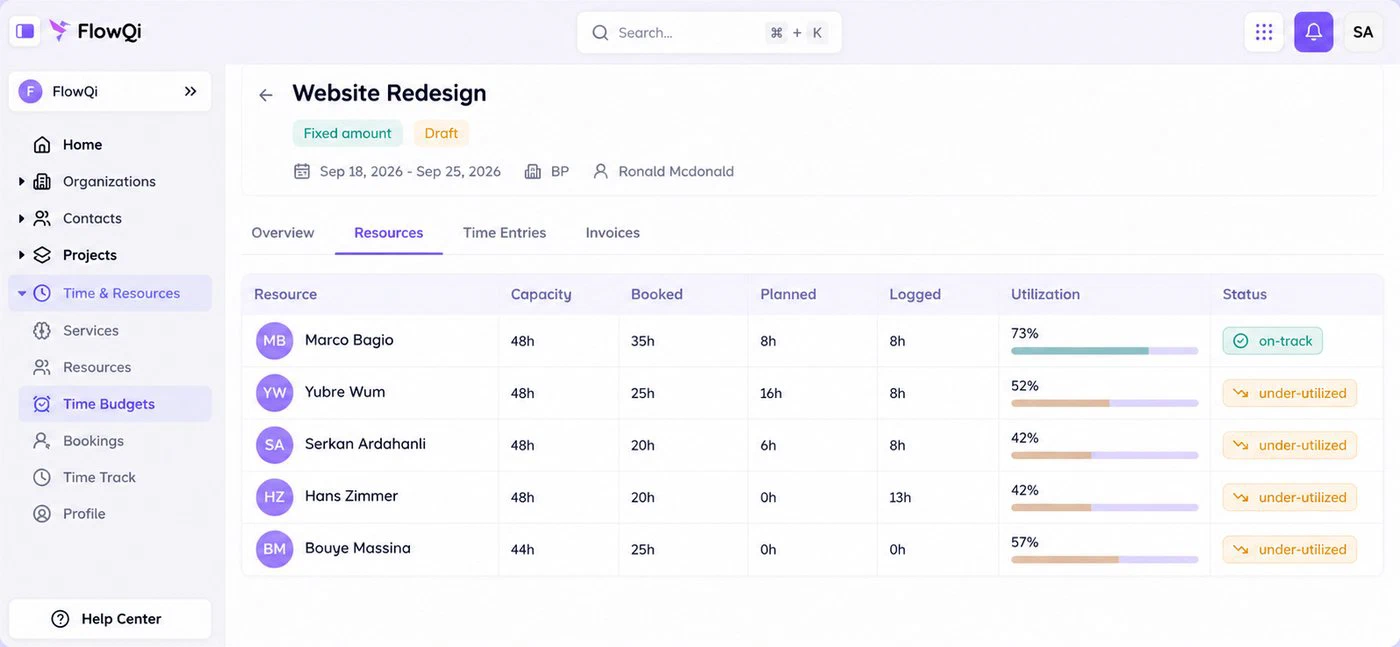
Resource view on a FlowQi project: capacity, booked, planned and logged hours per person, with utilisation

1. FlowQi

Our product

Best when only part of your team tracks time.

  • €100 for a team of 10
  • No minimum
  • Free plan
Choose FlowQi if

not everyone in your firm needs the whole chain. Everyone works free on Basic with CRM, projects and tasks. Time & Resources, which covers hours, time budgets, capacity planning and utilisation, is €25 per user for the people who use it, and Invoicing is €25 per user for the people who invoice. For a team of 10 where 3 track time and 1 invoices, that is €100 a month.

Less suited if

you want the financial depth of an established platform. Profitability reporting per project, client and person is where the older tools on this list are strongest. Roles and permissions, private projects and reporting sit in Core, at €25 per user for the whole team, and FlowQi has few public reviews so far.

What you get and what it costs

Strong at

  • CRM, projects and tasks free for the whole team.
  • Hours and capacity planning in one module.
  • Invoices built from logged hours, on the free plan too.
  • No seat minimum and no setup fee.

Weaker at

  • Less reporting depth than the established platforms.
  • Young product with few public reviews.

Prices

  • Basic: free, unlimited users.
  • Time & Resources: €25 per user (€20 billed yearly).
  • Invoicing: €25 per user (€20 billed yearly).
  • Core: €25 per user for the whole team (€20 billed yearly).
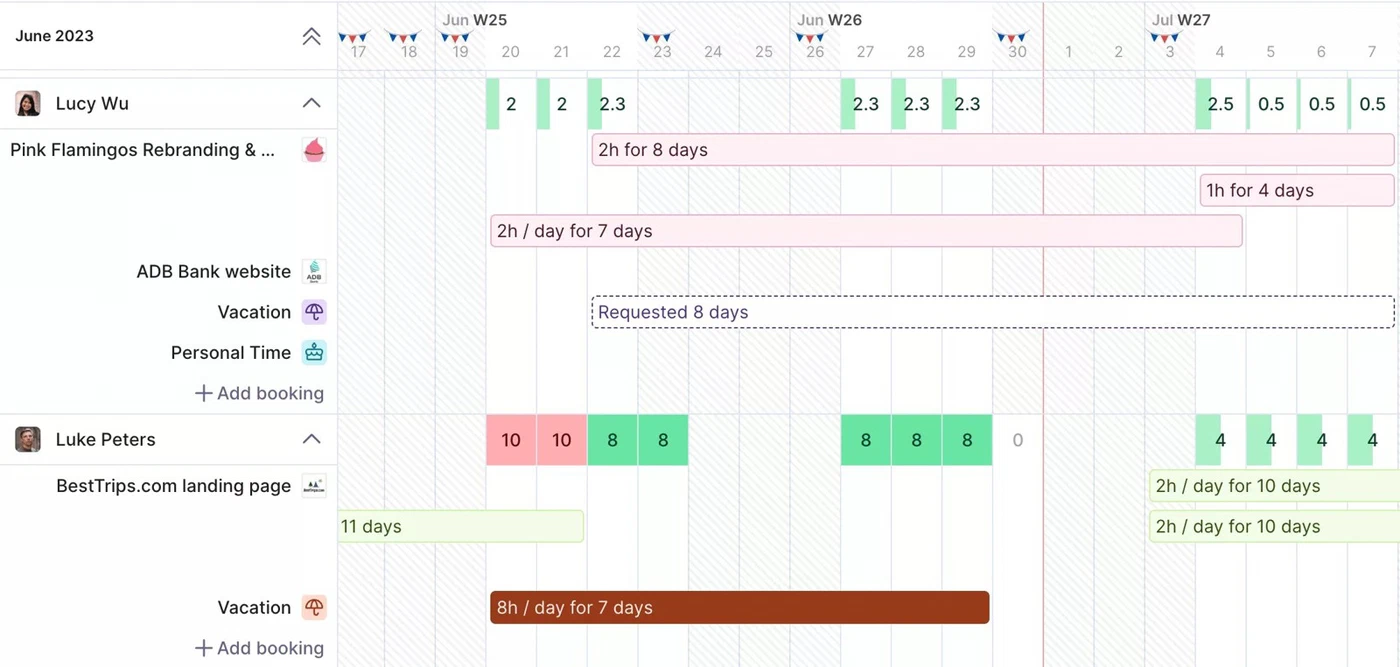
Capacity planning in Productive: bookings per person per day, with overbookings marked in red

2. Productive

Best all-rounder that publishes its price.

  • $120 for a team of 10
  • Minimum 3 seats
  • Rated 4.6 out of 5
Choose Productive if

you want budgeting, resource planning, time tracking and profitability reporting on the first paid plan, from a platform reviewers rate highly. Essential is $12 per user per month, or $10 billed yearly. Profitability per project, client and person is what users praise most.

Less suited if

you need invoicing, rate cards or billable time approvals, which start on Professional at $29 per user. Every plan needs three paid seats and contractors count as seats. Above 50 users the Professional price is replaced by a sales conversation, and the mobile app is rated well below the platform itself.

Strengths, weaknesses and prices

Strong at

  • Budgeting, resourcing and time tracking on the first plan.
  • Profitability reporting per project, client and person.
  • Support that reviewers rate highly.

Weaker at

  • Invoicing and rate cards only on Professional.
  • Three-seat minimum, contractors included.

Prices

  • Essential: $12 per user ($10 billed yearly).
  • Professional: $29 per user ($25 billed yearly).
  • Ultimate: on request.
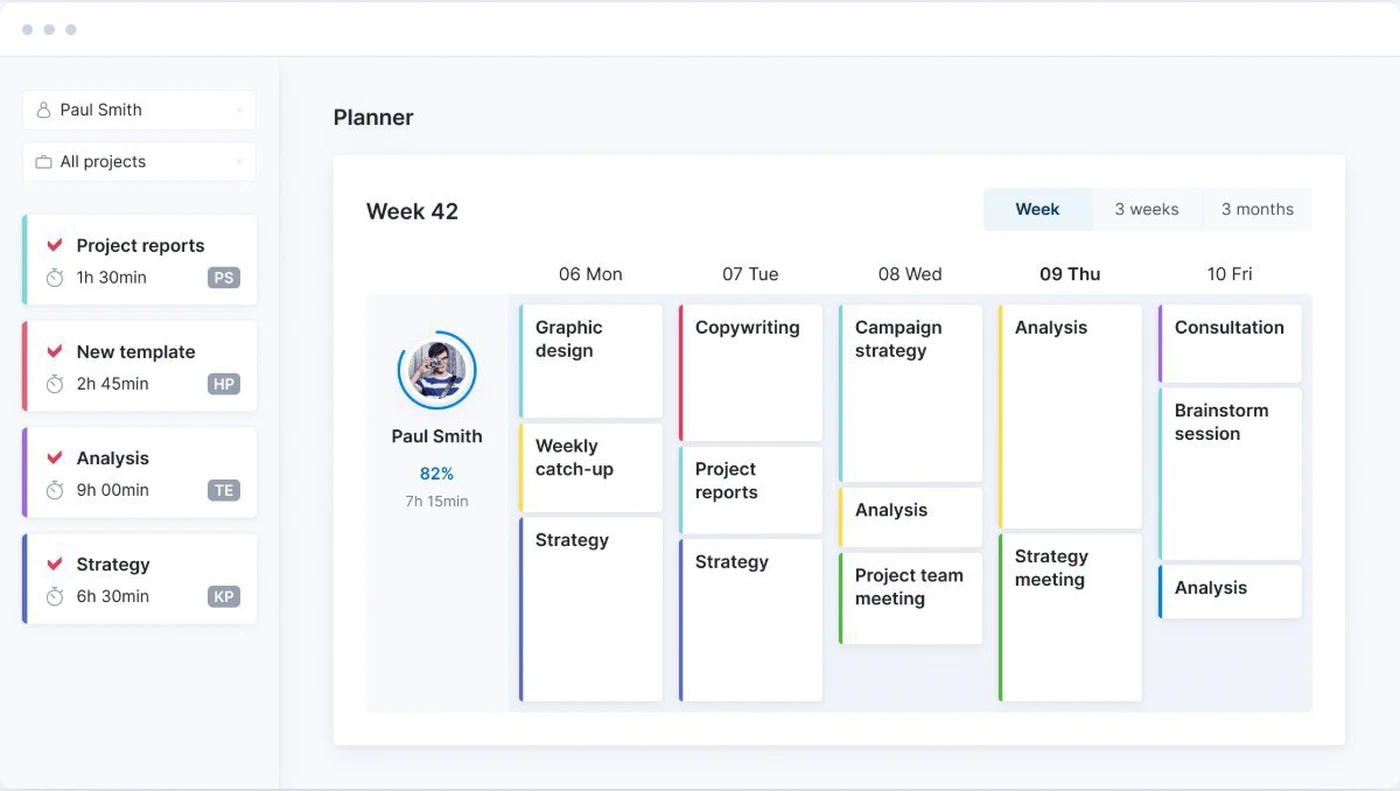
Planner in Scoro: one person's tasks across a week

3. Scoro

Best for quotes, budgets and financial reporting.

  • $170 for a team of 10
  • Minimum 5 users
  • All currencies published
Choose Scoro if

finance is the reason you are buying. Scoro covers quotes, projects, time, resourcing, budgets, invoices and financial reporting, with multiple currencies and a mature reporting layer. Time-billing, which is time tracking plus invoicing, is $17 per user per month, and all eight apps together are $57.

Less suited if

your team is smaller than five, or you want one thing rather than a platform. Every combination starts at five users, you always buy at least two of the eight apps, and time tracking with planning and invoicing together only arrive on the $57 package. Scoro says getting fully up and running takes a few days to a few months.

Strengths, weaknesses and prices

Strong at

  • Quotes, projects, time, resourcing and finance in one platform.
  • Mature financial reporting and multiple currencies.
  • Publishes every currency side by side.

Weaker at

  • Five-user minimum and no free plan.
  • The full chain only on the top package.

Prices

  • Time-billing: $17 per user, time and invoices.
  • Projects & Resources or Quote to Cash: $29.
  • End-to-end: $57, all eight apps.
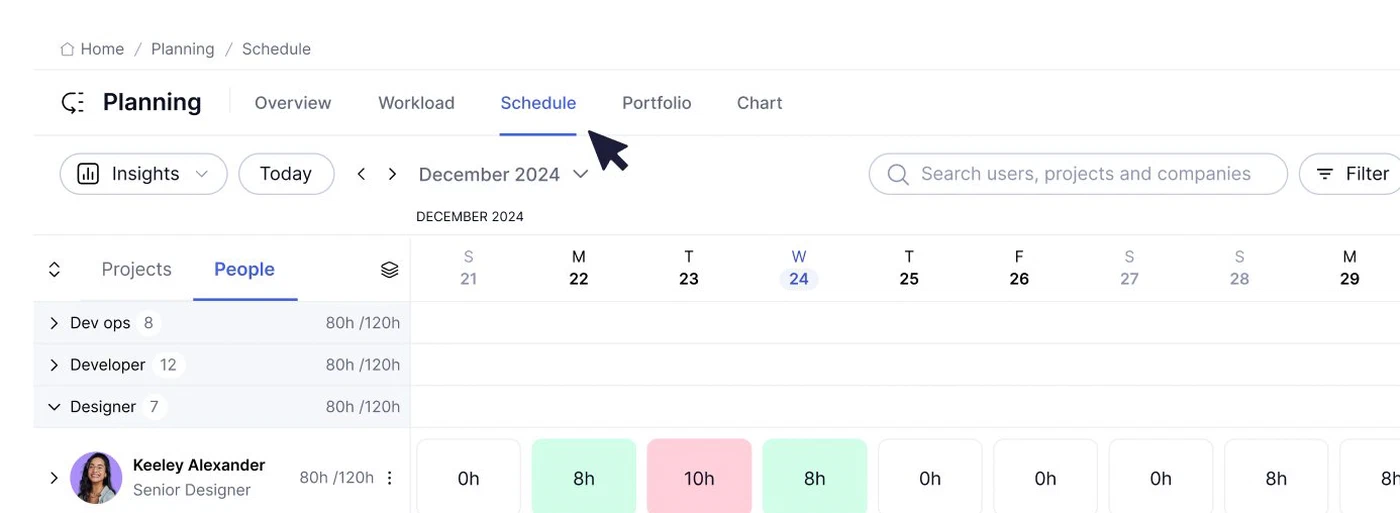
Schedule in Teamwork.com: hours planned per person per day against their capacity

4. Teamwork.com

Best free plan, and best for billing from logged time.

  • $249.90 for a team of 10
  • Free up to 5 users
  • Prices in dollars
Choose Teamwork.com if

your work is client projects and you bill from the hours your team logs. It is also the only platform here with a real free plan for a small team: up to 5 users and 5 projects. Basics starts at $9.99 per user per month billed yearly, and invoicing from logged time sits on Accelerate at $24.99.

Less suited if

you want quotes and a sales pipeline in the same place. Quotes sit on Optimize, which is priced on request, and Accelerate has a five-user minimum, so a team of six pays more per head than the tier below.

Strengths, weaknesses and prices

Strong at

  • Free plan for up to 5 users and 5 projects.
  • Invoicing from logged time on Accelerate.
  • Built around client work and billable hours.

Weaker at

  • Quotes only on Optimize, priced on request.
  • Minimum of 5 users on Accelerate.

Prices

  • Free: up to 5 users and 5 projects.
  • Basics: $9.99 per user billed yearly, minimum 3.
  • Accelerate: $24.99 per user billed yearly, minimum 5.
  • Optimize and Enterprise: on request.
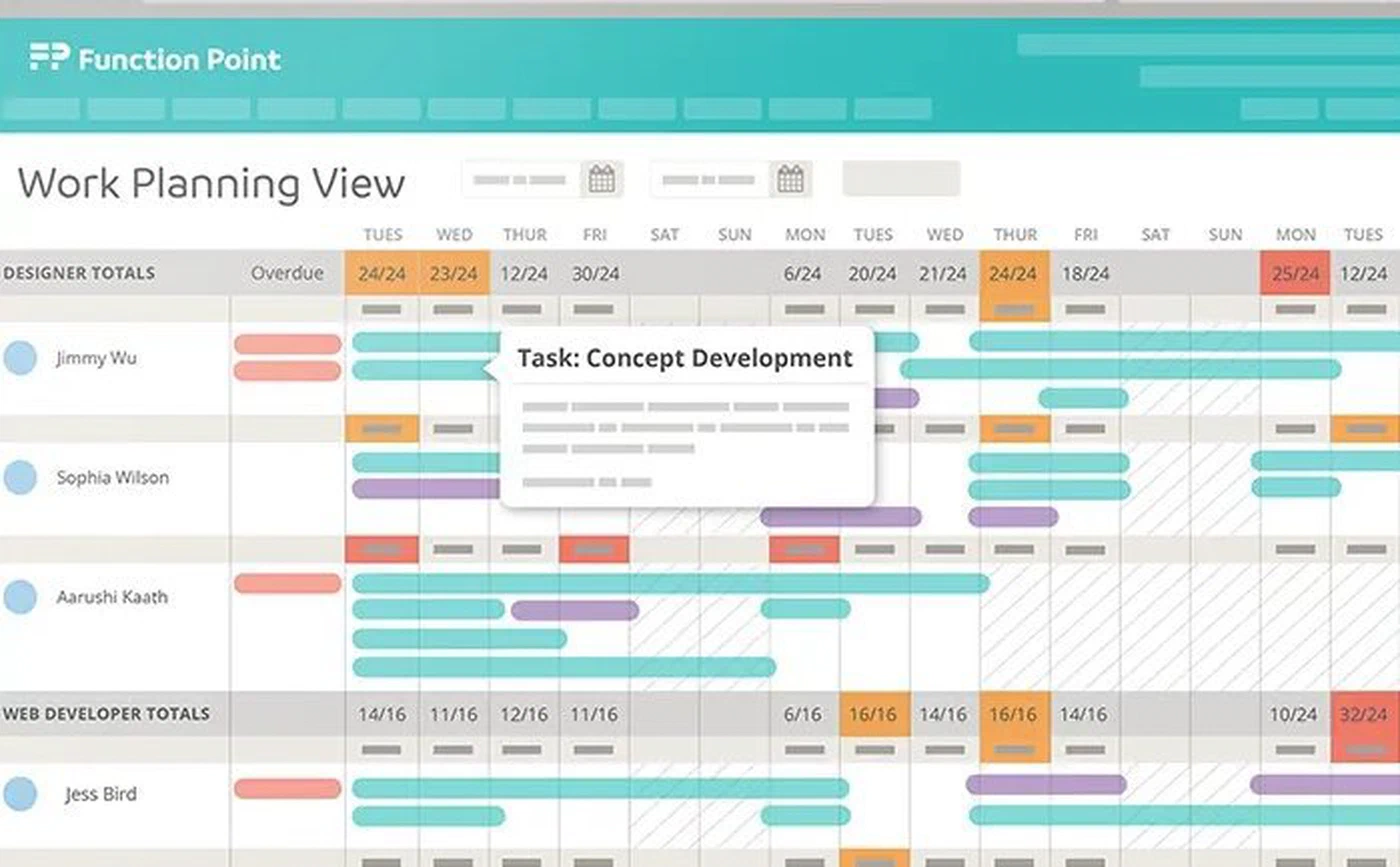
Work planning view in Function Point: planned work per designer per day across a week

5. Function Point

Best agency-specific platform with a published price.

  • $580 for a team of 10
  • Onboarding fee applies
  • Prices in dollars
Choose Function Point if

you want a system built specifically for agencies, with estimates, jobs, time and financials in one place, and a named success manager rather than a help centre. Standardize is $58 per user per month, or $53 billed yearly, and includes estimating and invoicing on both plans.

Less suited if

you are cost-sensitive or want to start small. It is the most expensive published price here, a one-off onboarding fee applies on top, and no minimum team size or free plan is published.

Strengths, weaknesses and prices

Strong at

  • Estimates, jobs, time and financials built for agencies.
  • Estimating and invoicing on both plans.
  • Named success manager.

Weaker at

  • Highest published price per user here.
  • One-off onboarding fee on top.

Prices

  • Standardize: $58 per user ($53 billed yearly).
  • Optimize: on request.
  • Onboarding fee: quoted per company.
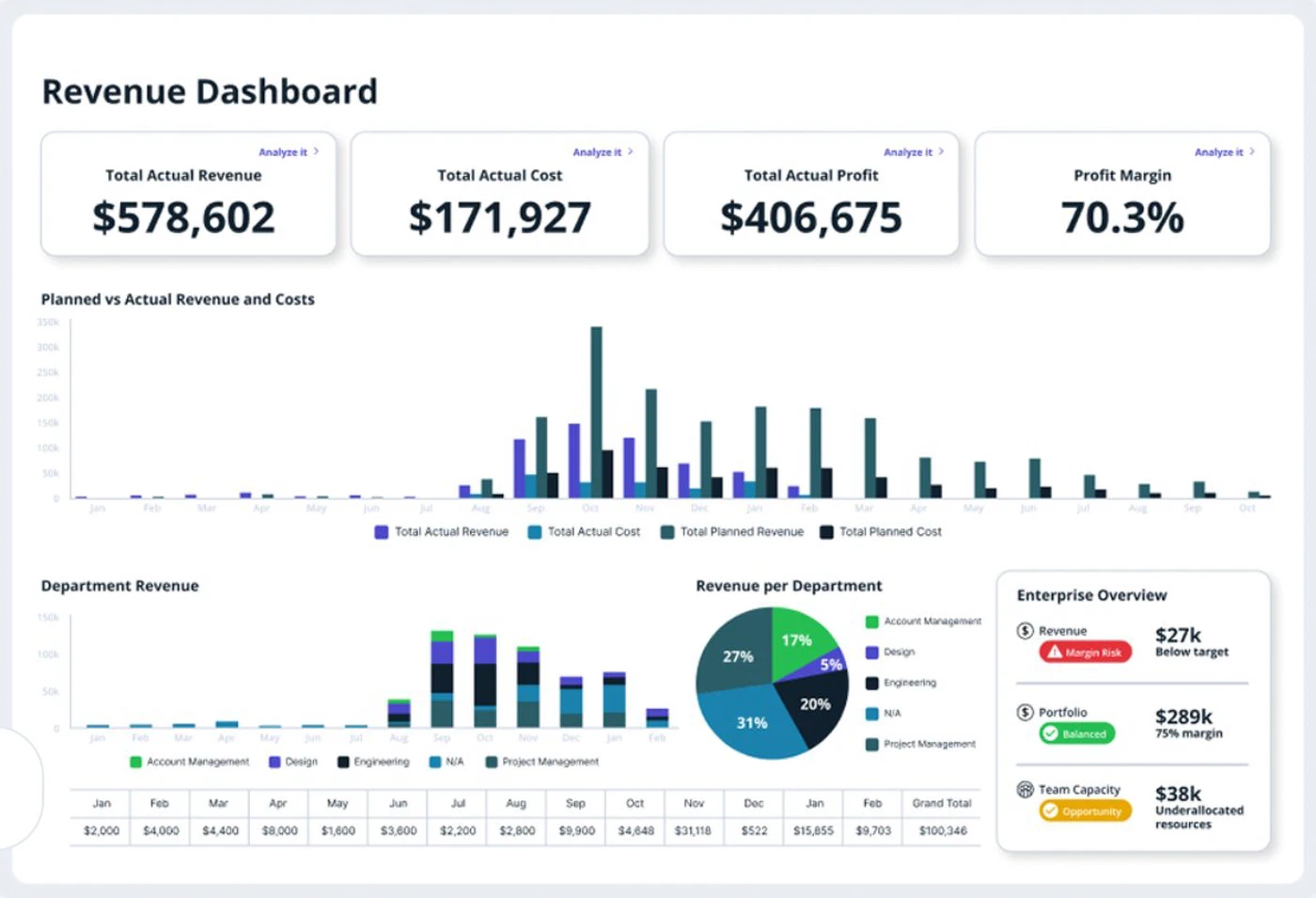
Revenue dashboard in Accelo: actual revenue, cost, profit and margin, with revenue per department

6. Accelo

Best for retainers and ongoing service work.

  • Price on request
  • Retainers and tickets
  • Xero and QuickBooks listed
Choose Accelo if

your revenue is not only projects. Accelo handles retainers and service tickets alongside project work, which most platforms here treat as an afterthought, and lists integrations with Xero, QuickBooks Online and Sage Intacct.

Less suited if

you want to compare prices before you talk to anyone. Accelo publishes no price, no minimum team size and no free plan, so the first number arrives through a sales conversation.

Strengths, weaknesses and prices

Strong at

  • Retainers and service tickets alongside projects.
  • Accounting integrations listed.
  • Guided implementation.

Weaker at

  • No published price.
  • No free plan or self-serve start.

Prices

  • All plans: quoted per company.
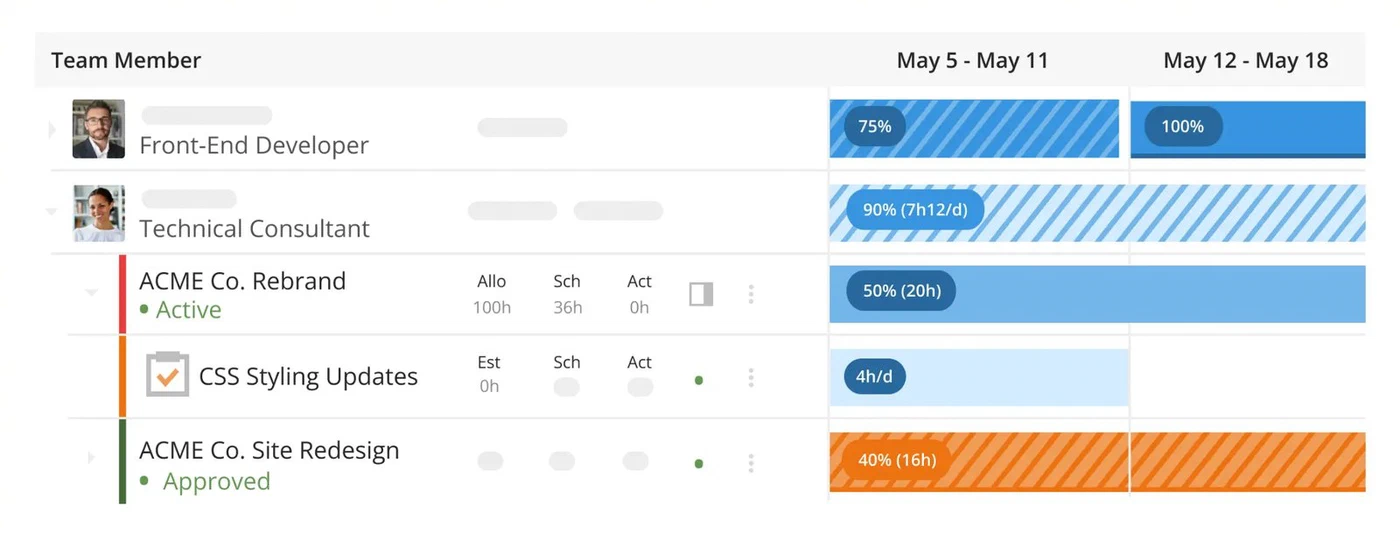
Scheduling across projects in Kantata: allocated, scheduled and actual hours per person per week

7. Kantata

Best for resource forecasting in larger firms.

  • Price on request
  • Mid-market and up
  • Skills and forecasting
Choose Kantata if

staffing is the problem you are buying software to solve, across a portfolio rather than a handful of projects. Kantata is built around it: skills, utilisation, demand against supply, and forecasting which roles you will be short of.

Less suited if

you are a small agency. Kantata targets mid-market and enterprise services firms, publishes no price and no free plan, and the depth it adds is depth a small team will not use.

Strengths, weaknesses and prices

Strong at

  • Skills inventory and resource forecasting.
  • Supply and demand planning across a portfolio.
  • Built for larger services organisations.

Weaker at

  • No published price.
  • Heavy for a small agency.

Prices

  • All plans: quoted per company.

Frequently asked questions

What is PSA software?

PSA stands for professional services automation. It is software that runs the chain a services firm sells: the quote, the project, the hours people log against it, who is booked in the coming weeks, and the invoice at the end. The point is that those steps share one set of data, so the hours on a project are the same hours on the invoice and in the margin you report.

What is the difference between PSA software and project management software?

Project management software answers what needs doing and by when. PSA answers what the work is worth: whether the project is inside budget, who is available to staff the next one, which hours are billable, and what you can invoice. A project tool tracks tasks; PSA connects those tasks to money and capacity.

What does PSA software cost?

For a team of 10 where 3 people track time and 1 sends invoices: FlowQi is €100 a month, Productive Essential $120, Scoro Time-billing $170, Teamwork.com Accelerate $249.90 billed yearly, and Function Point Standardize $580 plus an onboarding fee. Accelo and Kantata quote per company. Add invoicing at Productive and it becomes $290. Prices checked in September 2026.

Which PSA platform is best for a small agency?

Below five people, the seat minimums decide it. Scoro starts at five users and Productive at three, with contractors counted as seats. FlowQi has no minimum and a free plan for the whole team, with modules charged per person who uses them. Teamwork.com is free up to 5 users and 5 projects if billing from logged hours is all you need.

Which PSA tools publish their pricing?

FlowQi, Productive, Scoro, Teamwork.com and Function Point publish prices. Accelo and Kantata do not, and both quote per company based on your size and needs. Productive also stops showing a Professional price above 50 users.

Do I need PSA software if I already have a project tool and an accountant?

Not always. If your hours, your budgets and your invoices already line up without anyone retyping them, you have what PSA gives you. The reason firms switch is usually that they cannot see whether a project is still profitable until after it is finished, or that they cannot tell who is free next month without asking around.

Is there free PSA software?

There is no full PSA platform that is free. FlowQi Basic is free for unlimited users with CRM, projects and tasks, and you pay per person only for time tracking or invoicing. Teamwork.com has a free plan for up to 5 users and 5 projects. Everything else on this list is a trial of 14 days or a sales conversation.

Start free with your whole team

CRM and projects free for everyone. Time & Resources and Billing only for the people who use them.

How we compared: prices come from each vendor's own pricing page, checked on 13 and 18 September 2026, for a team of 10 where 3 people track time and 1 sends invoices. Where a vendor sets prices by country, we quote what an English-speaking buyer is shown. Screenshots of other products come from the vendors' own websites.